Skip to content
What Is an IPTV Service? The Complete 2026 Guide
An IPTV service is a way of watching television that sends channels and on-demand video to you over an internet connection instead of a cable, satellite dish, or rooftop aerial. “IPTV” stands for Internet Protocol Television. In practice it means you open an app on a device you already own, log in, and live TV plus a library of movies and series shows up the same way a streaming app would — except it is built around full channel line-ups and a programme guide rather than a single catalogue.
If you have ever watched a video that loaded in seconds and kept playing while it quietly downloaded the next bit in the background, you already understand the core of IPTV. The clever part is not the picture on screen. It is that the same internet connection carrying your email and video calls is also carrying a hundred live channels, and your player is stitching them together on the fly.
This guide walks through what an IPTV service actually is, how it works without the jargon, the different flavours you will run into, what you need to get started, and — the part most articles skip — how to tell a provider worth paying for from one that will vanish next month.
What an IPTV service really is
Strip away the marketing and an IPTV service is two things bundled together: a source of video (the channels and the on-demand library) and a way to deliver it (the internet). Traditional TV pushes the same broadcast out to everyone at once over dedicated infrastructure. IPTV flips that around. Your device requests the specific stream you want, and the server sends it to you as a flow of small data packets — the same packets that carry every other thing you do online.
The technology has been around far longer than most people assume. Telecom companies started bundling “TV over the phone line” in the mid-2000s, and the underlying idea — carrying television over an IP network — is now the backbone of how a huge slice of the world watches video. What changed recently is that you no longer need a special box from a phone company. A cheap streaming stick and an app do the same job.
Two phrases worth knowing because providers throw them around: live TV (channels playing in real time, like a news or live sports feed) and VOD, short for video on demand (movies and series you start whenever you like). A proper IPTV service usually gives you both, wrapped in an electronic programme guide so you can see what is on and what is coming up.
How an IPTV service works, in plain terms
Here is the whole journey, from the broadcaster’s signal to the picture on your TV, without the networking textbook.
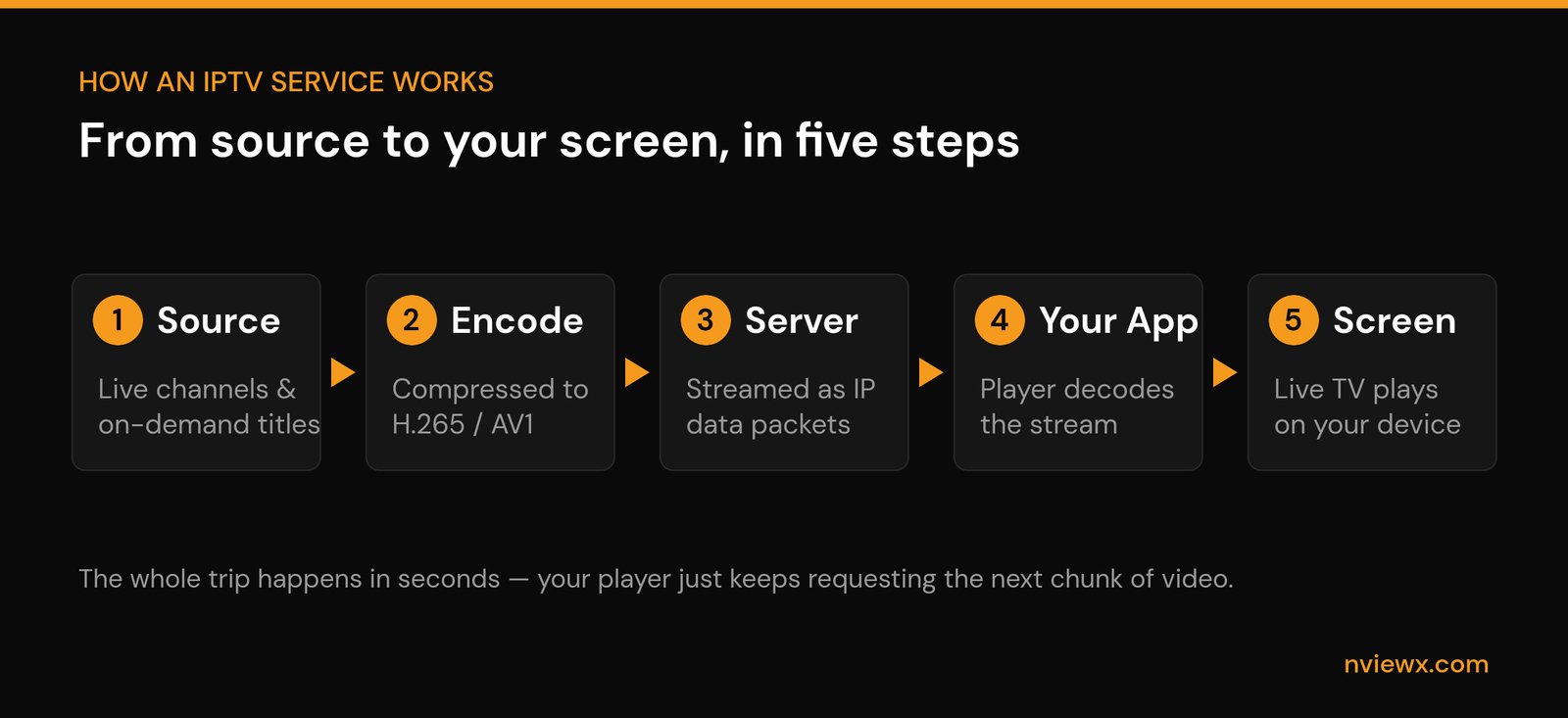
- Source. Live channels and on-demand titles arrive at the provider’s central facility — often called the headend.
- Encode. That video gets compressed into an internet-friendly format using a codec such as H.264, the more efficient H.265 (HEVC), or the newer AV1. Better compression means a sharper picture over a smaller connection.
- Serve. The compressed stream sits on servers, ready to be sent out. When you press play, the server starts handing your device the video in small chunks.
- Decode. Your app — the IPTV player — receives those chunks, decodes them, and queues the next one before the current one finishes. That buffer is why playback stays smooth even when your connection wobbles.
- Watch. The decoded video plays on your screen. The whole round trip happens in seconds, and your player just keeps quietly requesting the next piece.
Most modern services deliver this using HLS (HTTP Live Streaming), which breaks the video into short segments sent over ordinary web connections — the same plumbing that loads any website. That is a big reason IPTV works on almost anything with a screen: if a device can open a web page, it can usually play an HLS stream. Older managed networks used multicast protocols to send one live feed to many viewers at once, and you will still see that inside big telecom setups, but for a consumer app HLS is what you are almost certainly using.
The different types of IPTV you will run into
People say “IPTV” as if it is one thing. It is really a few different delivery styles, and knowing which one you are looking at helps you judge what to expect.
| Type | What it is | Best for |
|---|---|---|
| Live IPTV | Channels streaming in real time, just like flicking through a TV line-up. | Live sports, news, anything you want to watch as it airs. |
| Video on demand (VOD) | A library of movies and series you start whenever you like. | Binge-watching on your own schedule. |
| Catch-up / time-shifted | Rewind or replay programmes that aired in the last few days. | Watching something you missed without recording it. |
Most real-world IPTV services blend all three. You get live channels, a VOD catalogue, and a few days of catch-up, all inside the same app and the same login.
What you actually need to use an IPTV service
Less than people expect. The barrier to entry is genuinely low, which is part of the appeal.
- A decent internet connection. Around 10 Mbps is comfortable for HD; for 4K aim for 25 Mbps or more. Stability matters more than raw speed — a steady 15 Mbps beats a spiky 50 Mbps that drops every few minutes.
- A device. A streaming stick like a Firestick, an Android TV box, a smart TV, a phone, a tablet, or a computer. If it runs apps and connects to Wi-Fi, it can almost certainly run IPTV.
- A player app. Popular choices include TiviMate, IPTV Smarters, XCIPTV, Kodi with an add-on, or VLC for quick testing. The player is the remote-control layer; it does not provide the channels itself.
- Access details from a provider. Usually either an M3U playlist URL or Xtream Codes login (a server URL, username, and password) that you paste into the player.
- An EPG (optional but worth it). An electronic programme guide turns a flat channel list into a proper TV guide showing what is on now and next.
One honest gotcha: a wired Ethernet connection to your streaming device makes a bigger difference to live playback than almost any setting in the app. If you keep getting buffering on live channels in the evening, plug it in before you blame the provider.
IPTV vs cable vs OTT: how they actually differ
This is where the confusion lives, so let us be concrete. Cable is the old wall-socket model. OTT (over-the-top) is the single-app streaming model most people know. IPTV sits in between — internet-delivered like OTT, but built around full channel line-ups and a guide like cable.
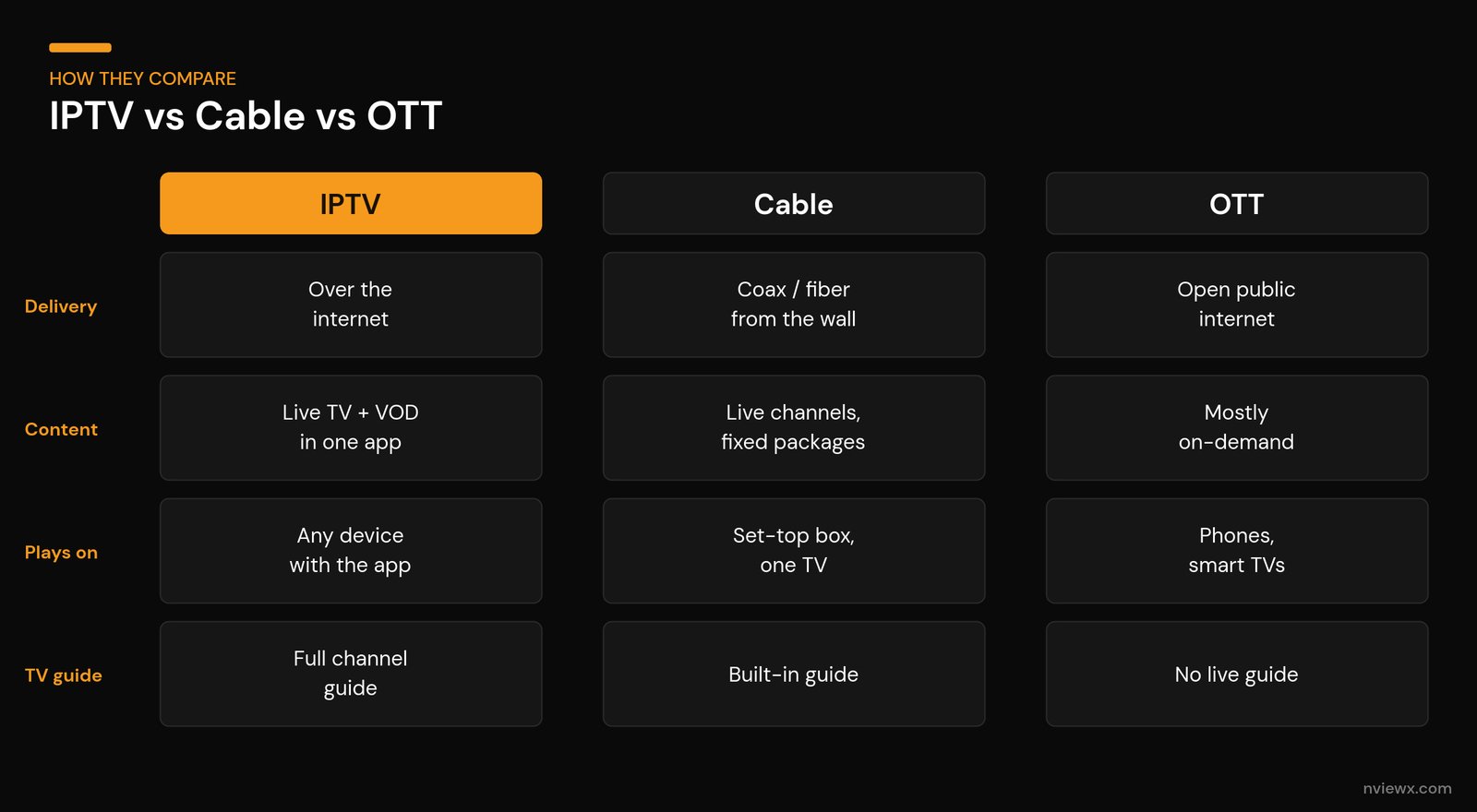
| IPTV | Cable / satellite | OTT streaming | |
|---|---|---|---|
| How it reaches you | Over the internet (managed or open network) | Coax cable, fibre, or a satellite dish | Over the open public internet |
| What you get | Live channels + VOD + catch-up in one app | Live channels in fixed packages | Mostly on-demand libraries; some live |
| Hardware | Any device with the right app | Provider’s set-top box, tied to one TV | Phones, browsers, smart TVs, sticks |
| Flexibility | High — watch on whatever you carry | Low — fixed install, long contracts | High — watch anywhere, cancel anytime |
| The trade-off | Quality depends on your connection and the provider | Reliable but inflexible and often pricey | Content scattered across many subscriptions |
Technically, OTT and IPTV overlap so much in 2026 that the line is blurry — plenty of services are really hybrids. The practical difference for you: IPTV feels like a TV line-up with a guide, OTT feels like a catalogue you scroll. Cable is the one you are probably trying to replace.
How to choose an IPTV provider you can trust
This is the section that matters, because the market is full of services that take your money and disappear. A few signals separate the steady ones from the fly-by-night ones.
- They let you trial it. A short paid trial or a clear refund window means they are confident the stream actually works on your setup. Run it in the evening, when everyone is online and servers are busiest — that is the real test.
- Stable, named contact. Real support you can reach, a consistent website, and a presence that has lasted more than a few months. Brand-new providers with no history are a coin flip.
- Honest about what they offer. Wild “every channel on earth for $5” claims are a red flag. Sustainable services price like a real business.
- It plays cleanly during peak hours. Channel-zapping should be quick, and live streams should hold up at 8pm, not just at noon. Buffering only in the evenings usually means an overloaded server, and that rarely improves.
- They operate legally. The single biggest filter. A provider with the proper rights to distribute its content is stable; one without is a legal and security risk that can go dark overnight. We break down how to vet this in our guide on how to get a legal IPTV service.
My rule of thumb: if a service makes it hard to test before you commit, walk away. The good ones want you to try it, because they know it works.
Setting up an IPTV service: the short version
The full walkthrough lives in our step-by-step IPTV setup guide, but here is the shape of it so you know what you are signing up for:
- Pick and install a player app on your device (TiviMate and IPTV Smarters are the usual starting points).
- Get your access details from the provider — either an M3U playlist URL or an Xtream Codes login.
- Paste those details into the player. With Xtream Codes it is server URL, username, password; with M3U it is a single link.
- Add an EPG URL if the provider supplies one, so you get a proper programme guide.
- Let the channel list load, and start watching. Most people are up and running in under ten minutes.
If channels load but the guide is blank, the playlist is fine and only the EPG needs attention — a common point of confusion that sends people back to support unnecessarily.
Staying safe and legal
IPTV as a technology is completely legal — it is just television delivered over the internet, and major telecom and media companies use it every day. What matters is the content a service is licensed to carry. A provider that distributes premium channels and live events without the rights to do so is operating illegally, and using it exposes you to unreliable streams, sudden shutdowns, and dodgy payment handling.
Two practical habits keep you on the right side of this. First, favour providers that are transparent about their licensing and have a real, lasting business presence. Second, protect your basics: pay through methods with buyer protection, never reuse an important password on a streaming account, and keep your player app updated. A VPN can add privacy on public networks, but it is not a substitute for choosing a legitimate service in the first place.
Frequently asked questions
Is an IPTV service legal?
The technology is fully legal — IPTV simply means TV delivered over the internet, and it is used by major broadcasters and telecom companies worldwide. Legality depends entirely on whether a given provider holds the rights to the content it streams. Stick with services that are transparent about their licensing.
How much internet speed do I need for IPTV?
Roughly 10 Mbps is comfortable for HD and 25 Mbps or more for 4K. A stable connection matters more than a high headline speed — a steady connection beats a fast one that keeps dropping. A wired Ethernet link to your streaming device is the single best fix for evening buffering.
What is the difference between IPTV and regular streaming apps?
Regular streaming (OTT) apps are built around an on-demand catalogue you scroll through. IPTV is built around live channels and a programme guide, like a traditional TV line-up, usually with a VOD library bolted on. In 2026 the two overlap heavily, and many services are really hybrids of both.
Do I need a special box for IPTV?
No. Any device that runs apps — a streaming stick, smart TV, phone, tablet, or computer — can run an IPTV player. The dedicated set-top boxes from the early telecom days are optional now.
What is an M3U playlist and Xtream Codes?
They are the two common ways a provider gives you access. An M3U playlist is a single link containing your channel list; Xtream Codes is a login made of a server URL, username, and password. You paste whichever one your provider supplies into your player app.
Why does my IPTV buffer in the evenings?
Evening-only buffering almost always points to an overloaded provider server during peak hours, a congested Wi-Fi connection, or both. Try a wired Ethernet connection first; if a stream still struggles only at peak times, the provider’s capacity is the likely culprit.
Can I use an IPTV service on more than one TV?
Usually yes, but how many devices can stream at the same time depends on your provider’s plan. Many sell single, double, or family connection tiers — check the simultaneous-stream limit before you buy if multiple people will watch at once.
Is a VPN required for IPTV?
Not required. A VPN adds privacy, especially on public or shared networks, and some people use one out of habit. It does not make an illegitimate service legitimate, though — choosing a properly licensed provider is what actually keeps you safe.
Ready to watch? If you want IPTV that just works — clean live channels, a real programme guide, and support that answers — take a look at what Nviewx offers, then follow our setup guide to be up and running in minutes.