 Skip to content
How an IPTV Encoder Works: From Camera to Stream (2026)
An IPTV encoder is the box (or software) that turns a raw video signal into a compressed stream your network can carry. It sits between a camera, satellite receiver, or playout system and the internet: it captures the feed, squeezes it down with a video codec, and hands it off to a streaming protocol so viewers can watch over an IP connection instead of a coax cable or an antenna. No encoder, no IPTV stream — full stop.
Here’s the part most articles bury: if you’re a regular viewer paying for a subscription and watching on your phone or a Firestick, you don’t need one. The encoder lives on the other side of the screen — with the broadcaster, the channel owner, or the operator who is sending the stream. This guide explains what the device actually does, the specs that matter, the hardware-vs-software choice, and who genuinely needs to buy one.
How an IPTV encoder works, in one pass
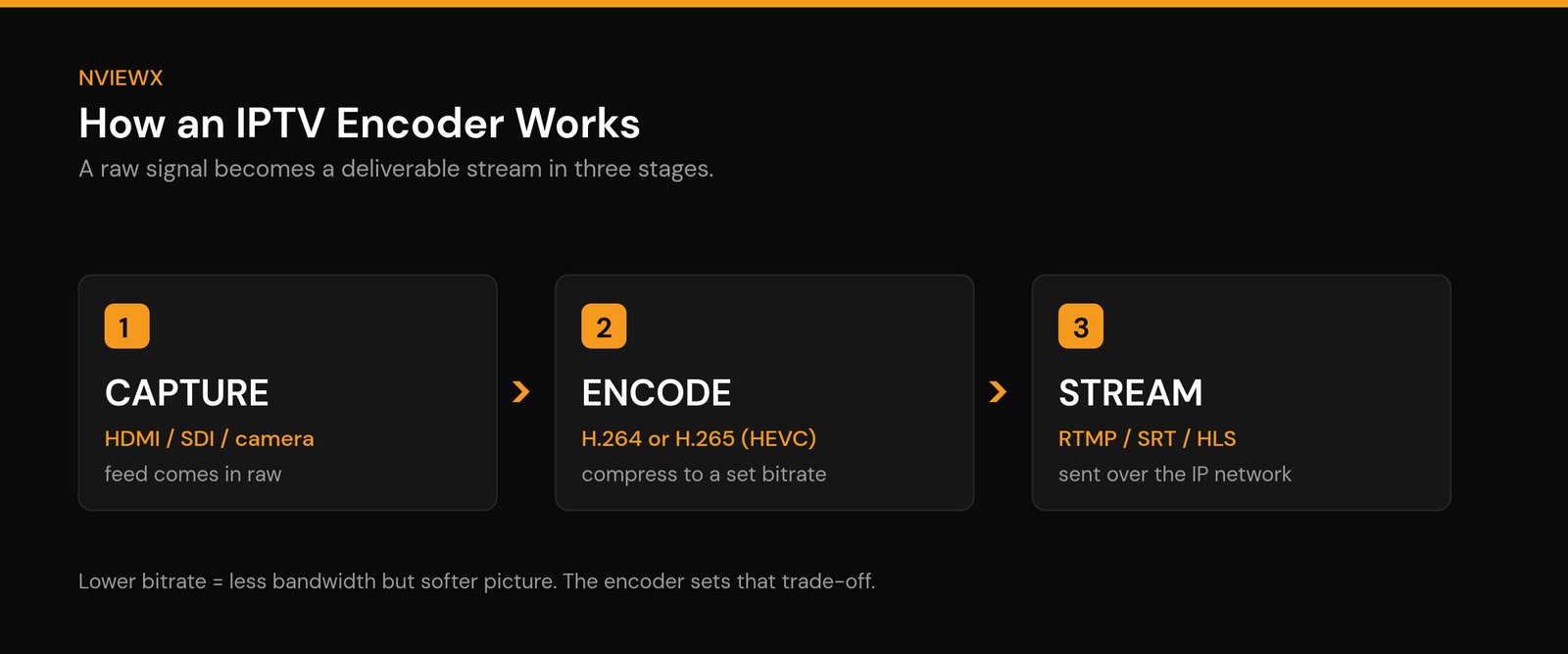
Five things happen between a live feed and the picture on your screen, and the encoder owns the middle three. Follow one frame through:
- Capture. The encoder takes in an uncompressed signal over HDMI, SDI or an IP input. A single 1080p frame is roughly 3 MB raw, so an uncompressed hour would run to hundreds of gigabytes. Nobody ships that over the internet.
- Compress. A video codec — H.264, or HEVC where the device on the other end can decode it — discards what the eye will not miss and describes most frames as the difference from the one before. This is where the 100:1-and-better reduction happens, and it is the step that decides how the stream looks.
- Package. Compressed video and audio are wrapped into a container with timing data so the player can keep picture and sound in step — for live channels that is almost always an MPEG transport stream.
- Deliver. The packaged stream is pushed to a server over a contribution protocol such as RTMP or SRT, and that server re-publishes it to viewers over HLS or as a continuous transport stream.
- Decode. Your player reverses step 2 on your own device. That is the decoder’s job, not the encoder’s — which is why a stream that encodes perfectly can still fail on one particular stick.
The chain is one-way and roughly real time. The encoder adds delay at step 2 because efficient compression needs a few frames of look-ahead, and that is a large part of why a live IPTV channel runs several seconds behind the same feed on an aerial.
One practical consequence worth knowing: if a channel reaches you as a “no signal” message instead of a picture, the break is almost always at step 4 or step 5 — the delivery leg or your own decoder — not at the encoder. Encoder faults look like a bad picture, not an absent one.
What an IPTV encoder actually does
Strip away the jargon and an encoder has one job: take a heavy, raw video signal and make it light enough to send over a network without it looking like a mess. A single second of uncompressed 1080p video is enormous — far too big to stream live. The encoder applies a video codec that throws away data the eye barely notices and keeps the parts that matter, shrinking the feed by a factor of roughly 100 or more.
The term encoder comes from exactly that: it encodes (compresses and packages) the signal into a defined format. In the IPTV world — short for Internet Protocol television — that packaged feed then travels over the same kind of network that delivers your web pages and email, which is what separates IPTV from traditional broadcast TV.
How encoding works: capture, compress, deliver
Every IPTV encoder, no matter how fancy, runs the same three-step loop.
1. Capture. The encoder takes in a video source. On hardware boxes that’s usually an HDMI or SDI input from a camera, a switcher, or a satellite/cable receiver. Software encoders capture from a connected camera, a capture card, or a screen. Some units also pull in separate audio and pre-process the picture — deinterlacing, scaling the resolution, or cleaning up noise before compression.
2. Compress (encode). This is the heavy lifting. The encoder runs the feed through a codec — almost always H.264 or H.265 — at a target bitrate and resolution you set. This is where quality and bandwidth get traded against each other, and it’s the single most important thing an encoder does.
3. Deliver. The compressed stream is wrapped in a transport protocol — RTMP, SRT, HLS, or UDP/multicast — and pushed out to a streaming server, a CDN, or directly onto a local network. From there it reaches players and apps, often after the server has repackaged it into an M3U playlist the app can read.
That final feed is the raw material behind an IPTV service. Everything the viewer experiences — channel switching, the guide, on-demand — sits on top of streams that an encoder produced first.
Hardware vs software encoders
This is the first real decision anyone setting up a stream has to make, and there’s no universally “right” answer — it depends on how often the thing has to run and how much you want to babysit it.
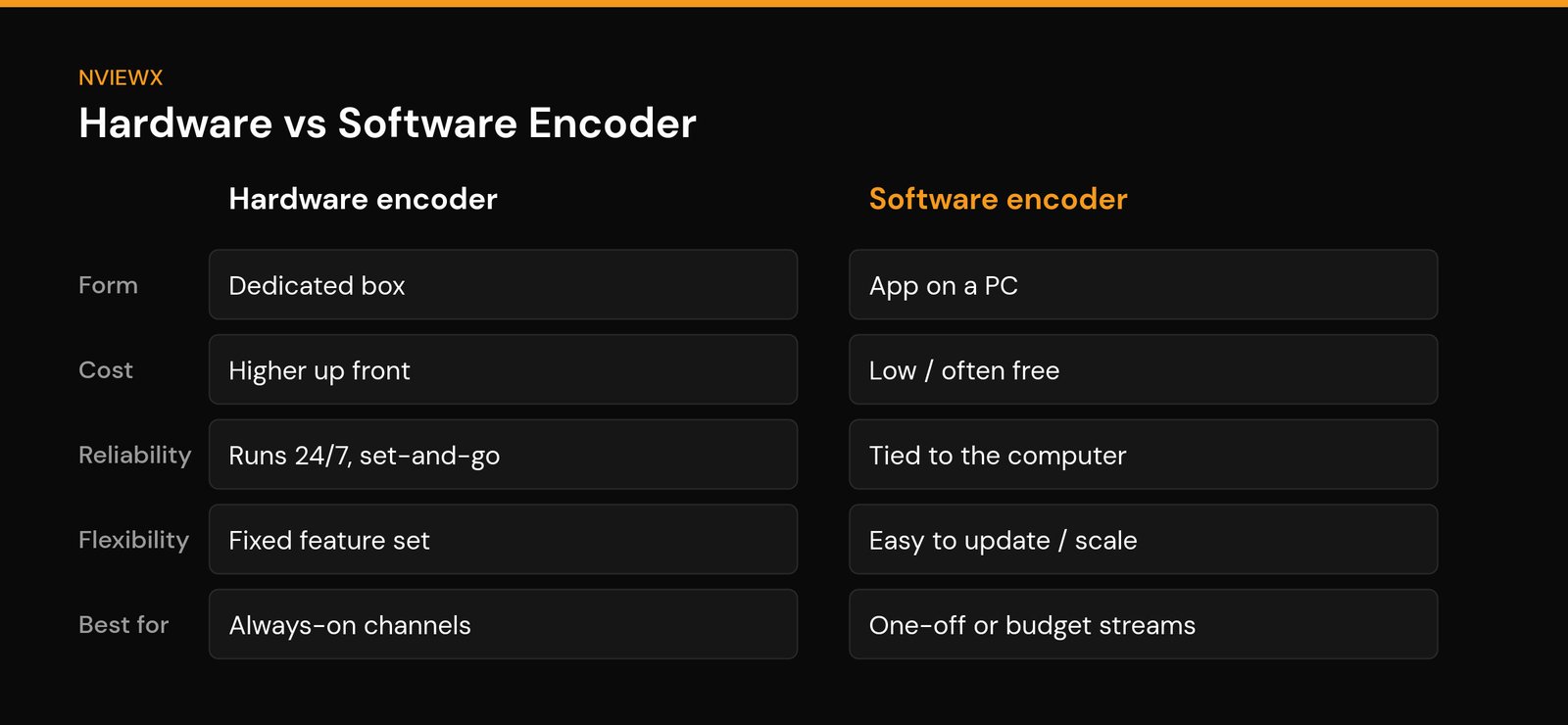
A hardware encoder is a dedicated appliance. You plug a feed into it, set it once, and it runs — quietly, 24/7, without an operating system to crash on you. That reliability is why broadcasters and always-on channels lean on them. The downside is cost and rigidity: you pay more up front and you’re stuck with whatever features the box shipped with.
A software encoder runs on a regular computer and uses its CPU or GPU to do the same compression. It’s cheap (some are free), flexible, and easy to update as standards move. The catch is that it’s only as stable as the machine it runs on — if the PC hiccups, your stream does too — and heavy encoding can pin your processor.
| Factor | Hardware encoder | Software encoder |
|---|---|---|
| Form | Dedicated standalone box | App on a PC or server |
| Cost | Higher up front | Low, sometimes free |
| Reliability | Built to run 24/7, set-and-forget | Only as stable as the computer |
| Flexibility | Fixed feature set | Easy to update and reconfigure |
| Best for | Always-on channels, live events | One-off streams, testing, tight budgets |
The specs that actually matter
Encoder spec sheets are long. In practice, five things decide whether your stream looks good and reaches people.
Codec (H.264 vs H.265/HEVC). H.264 is the safe, universal default — almost every device on earth can decode it. H.265, also called HEVC, delivers roughly the same picture at about half the bitrate, which is a big deal for 4K or bandwidth-tight setups. The trade-off: HEVC needs more processing power to decode and can carry licensing fees, and a few older players still choke on it. Many encoders now output both.
Bitrate. This is how much data per second the stream uses, and it’s the dial that controls quality. Too low and you get blocky, smeary video; too high and viewers on slower connections buffer. As a rough starting point, 1080p over H.264 sits comfortably around 5–8 Mbps; the same picture in H.265 might need only 3–4. There’s no magic number — you tune it to your audience’s connection.
Resolution and frame rate. 720p, 1080p, or 4K, at 30 or 60 frames per second. Higher is not automatically better — a clean, stable 1080p beats a stuttering 4K every time, and it costs far less bandwidth.
Latency. The delay between something happening and a viewer seeing it. For a movie channel, a few seconds is fine. For live sports or anything interactive, you want it tight — which steers you toward low-latency protocols like SRT rather than standard HLS.
Output protocol. RTMP is the old workhorse for pushing into streaming platforms. SRT is the modern favorite: secure and resilient over shaky internet connections, which is why remote and live productions love it. HLS and MPEG-DASH are the formats that actually reach phones, smart TVs, and browsers. Many setups encode once, then a server transcodes that feed into several bitrates so each viewer gets a version that fits their connection.
Who actually needs an IPTV encoder
Plain answer: people who send streams, not people who watch them.
You need an encoder if you’re a broadcaster putting live TV channels onto an IP network, a channel owner or operator building a lineup, a house of worship or school streaming services and events, a business running internal video or digital signage across a building, or anyone producing a live event — a conference, a game, a performance — that has to go out over the internet in real time.
You don’t need one if you’re an everyday viewer. Your Firestick, smart TV, phone, or an app like TiviMate or IPTV Smarters already contains a decoder — the opposite of an encoder — that unpacks the stream for you. The encoding happened long before the stream reached your device. If you just want to watch, what you actually need is a working IPTV setup on your device, not encoding hardware.
Setup basics if you’re the one streaming
The exact menus differ by brand, but the flow is the same on every encoder.
Connect your source to the input (HDMI or SDI on a box; a capture card or camera on software). Pick your codec — H.264 for maximum compatibility, H.265 if you need to save bandwidth and know your viewers can decode it. Set the resolution, frame rate, and a sensible bitrate for your audience. Choose your output protocol and paste in the destination: a server URL and a stream key for RTMP, or the receiver’s address and port for SRT. On many operator setups the destination ties into Xtream Codes credentials that the player app then uses to pull the stream. Hit start, then — this part matters — open the stream on a real player and watch it for a few minutes before you trust it.
If you’re running channels, pair the stream with an EPG (electronic program guide) so viewers see what’s on and what’s next, the same way a normal TV guide works.
Common mistakes people make
Cranking the bitrate too high. A gorgeous 12 Mbps stream is useless if half your audience buffers. Match the bitrate to the slowest connection you actually care about serving.
Forgetting the upload pipe. Your upload speed is the bottleneck, not download. If you’re pushing 8 Mbps out and your line only uploads 10, you have no headroom — one hiccup and the stream stalls.
Choosing H.265 without checking decoders. HEVC saves bandwidth but some older devices and players can’t decode it smoothly. If your audience is mixed, H.264 is the safer bet — or output both.
Relying on Wi-Fi for the encoder. A live encoder belongs on a wired Ethernet connection. Wi-Fi drops are the number-one cause of mystery stream interruptions.
Never testing latency. If you’re doing anything live and interactive, measure the actual delay before the event — not during it. The default HLS settings can add 20–30 seconds you didn’t expect.
Frequently asked questions
Do I need an IPTV encoder to watch IPTV?
No. Viewers don’t need an encoder — your device already has a decoder built in. Encoders are for the people and operators who create and send streams, not for watching them.
What’s the difference between an encoder and a decoder?
An encoder compresses a video signal into a stream for delivery; a decoder does the reverse, unpacking that stream back into watchable video. Your phone, smart TV, and Firestick are decoders. The two are opposite ends of the same chain.
Is a hardware or software encoder better?
Neither is better in the abstract. Hardware wins for always-on, set-and-forget reliability; software wins on price and flexibility. For a permanent channel, get hardware. For a one-off event or testing, software is usually fine.
Should I use H.264 or H.265 (HEVC)?
Use H.264 when you want maximum compatibility — nearly every device decodes it. Use H.265/HEVC when you need to save bandwidth or stream 4K and you’re confident your viewers’ devices can decode it. When unsure, output both.
What bitrate should I encode at?
It depends on resolution, codec, and your audience’s connection. As a rough guide, 1080p over H.264 runs well around 5–8 Mbps, and roughly half that in H.265. Always leave headroom below your upload speed.
What’s the difference between encoding and transcoding?
Encoding compresses a raw signal into a stream. Transcoding takes an already-encoded stream and re-processes it — usually into several bitrates and resolutions — so each viewer can get a version that fits their connection. Big services do both.
Why is my stream lagging or buffering?
Usually bitrate set too high for the upload connection, a Wi-Fi-connected encoder dropping packets, or a protocol with high built-in latency. Lower the bitrate, switch the encoder to wired Ethernet, and consider SRT for unstable links.
Can one encoder output multiple channels or qualities?
Many can. Higher-end encoders output several streams at once or feed a transcoder that fans the signal out into multiple bitrates — the foundation of adaptive streaming, where the player picks the best quality your connection can handle in real time.
Want the viewer side made simple? Nviewx focuses on getting streams playing cleanly on the devices you already own — no encoders, no hardware to buy. Browse our jargon-free IPTV guides to set things up the easy way.








