Skip to content
What Is an IPTV Box? A Simple Guide for 2026
An IPTV box is a small streaming device that plugs into your TV’s HDMI port and turns ordinary internet broadband into live TV and on-demand video. Instead of pulling signal from an antenna, satellite dish, or cable feed, it downloads everything over your home network, then plays it through an app. If you have used a streaming dongle, the idea is the same; an IPTV box just tends to be more powerful and more flexible about which apps and playlists you can run on it.
This guide explains what an IPTV box actually is, how it works under the hood, the different types you’ll run into, how it stacks up against a streaming stick or your TV’s built-in apps, and the specs that genuinely matter before you spend any money.
What an IPTV box really is
IPTV stands for Internet Protocol Television, and an IPTV box is simply the hardware that receives that internet-delivered video and shows it on a normal television. Most modern boxes are small Android-based computers: they have a processor, memory, storage, a network connection, and an operating system you can install apps onto. You connect the box to your TV with one HDMI cable, connect it to the internet over Wi-Fi or Ethernet, sign in to a service, and you’re watching.
The key thing to understand: the box is the player, not the content. It needs a source, usually an IPTV service that hands you either an M3U playlist link or a set of Xtream Codes login details. The box loads that source into an IPTV app and turns the stream into something watchable on your sofa.
How an IPTV box works
The flow is simple once you break it down. You can think of it as three steps: connect, authenticate, decode.
- Connect. The box joins your home network over Ethernet or Wi-Fi and reaches the open internet. No dish, no aerial, no coax from the wall.
- Authenticate. Inside an IPTV player app (such as TiviMate, IPTV Smarters, or a similar client), you enter your service’s playlist URL or Xtream Codes credentials. The app pulls the channel list and the program guide (EPG).
- Decode and play. When you pick a channel, the box requests that video stream, decodes it in real time using its processor’s hardware video decoder, and outputs it over HDMI at the right resolution.
Because everything rides on your broadband, your internet speed and the box’s decoding power decide how smooth it feels. A weak chip will stutter on a 4K stream even if your connection is fast; a fast chip on a slow connection will still buffer. Both have to be up to the job.
It’s worth knowing that the technology itself is mainstream and legitimate; the same IPTV delivery method is used by major telecom operators for their own TV packages. The box is neutral hardware. What you point it at is what matters, so always use a service you have a legal right to access.
Types of IPTV boxes
Not every “IPTV box” is the same. There are three broad families, and the difference affects what you can install and how long the device stays useful.
- Android TV / Google TV boxes. The most common and most flexible. They run a full version of Android with the Play Store, so you can install almost any IPTV player, plus extras like Kodi or a browser. Devices like the NVIDIA Shield sit at the premium end; plenty of mid-range boxes do the job for far less.
- Generic Android boxes. Cheaper, sold under dozens of brand names, often running an older or stripped-down Android build sideloaded from the maker. They can work well, but updates and quality vary a lot, so the spec sheet matters more than the box’s name.
- Dedicated set-top boxes (MAG-style). Purpose-built IPTV hardware such as MAG or Formuler models. They use a lightweight system (often based on Linux or set-top box firmware like Enigma2) and are designed to load a portal or playlist and little else. Simple and stable, but less of an all-purpose media machine than an Android TV box.
IPTV box vs streaming stick vs smart-TV app
People often ask whether they even need a box when they already own a streaming stick or a smart TV. Here’s the honest breakdown. A box usually wins on raw power and flexibility; a stick wins on price and portability; your TV’s built-in apps win on convenience but tend to age the fastest.
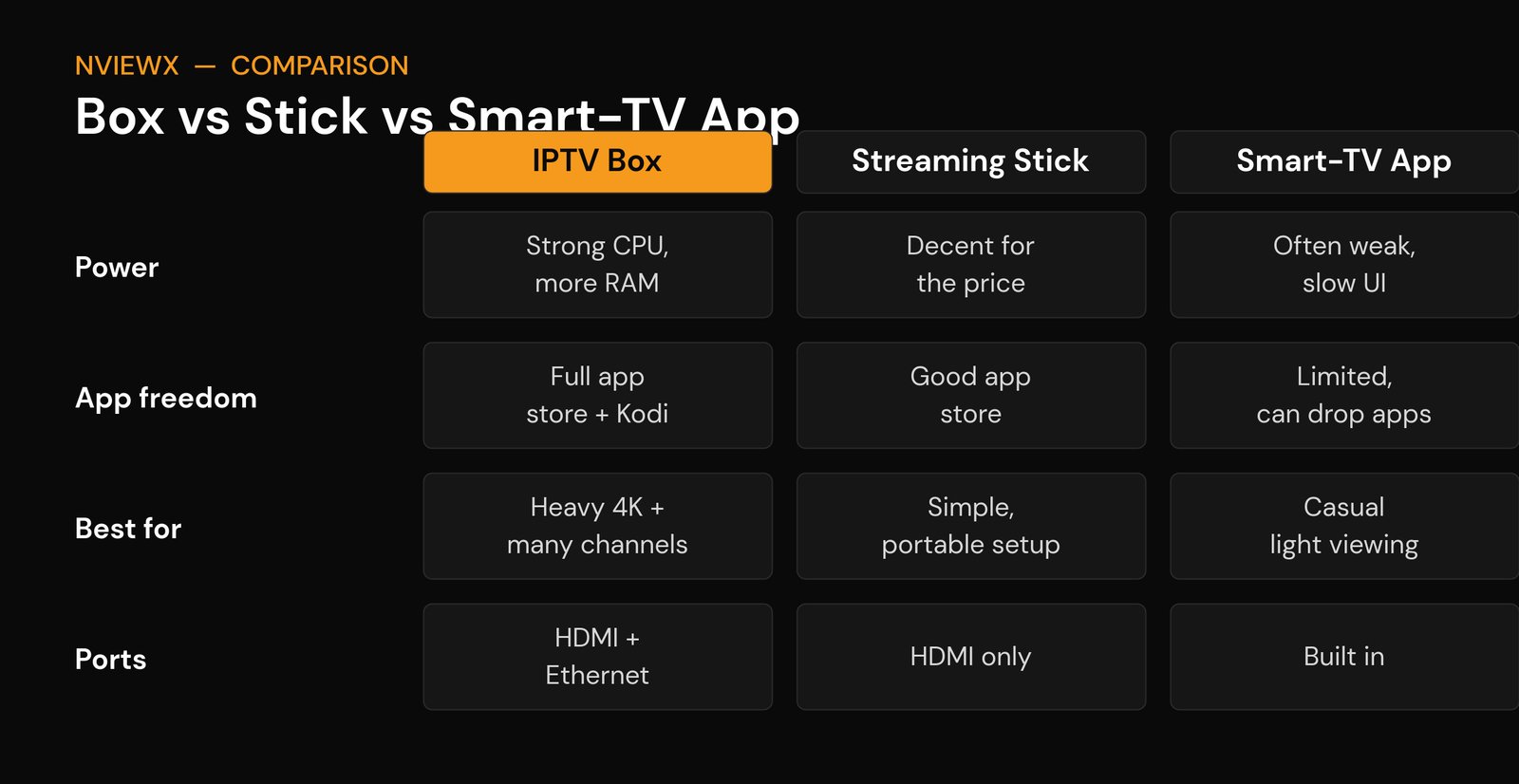
| What you care about | IPTV box | Streaming stick | Smart-TV app |
|---|---|---|---|
| Power | Strongest; handles 4K and big channel lists | Decent for the price | Often weak, sluggish menus |
| App freedom | Full store, sideloading, Kodi | Good, with some sideloading | Limited; apps can be dropped |
| Connectivity | HDMI plus wired Ethernet | HDMI, Wi-Fi only | Built into the TV |
| Best for | Heavy use, 4K, many channels | Simple, portable, budget setups | Casual, occasional viewing |
| Price | Mid to high | Low (roughly the cost of a meal out) | Free; already in the TV |
If you want IPTV on a stick you already own, our Firestick install guide walks through it. A Firestick is technically a stick, not a box, but it runs the same IPTV player apps and is the cheapest way to get started.
The specs that actually matter
Box marketing loves big numbers that mean nothing in practice. Ignore the hype and check these six things before you buy. They’re the difference between buttery 4K and a slideshow.
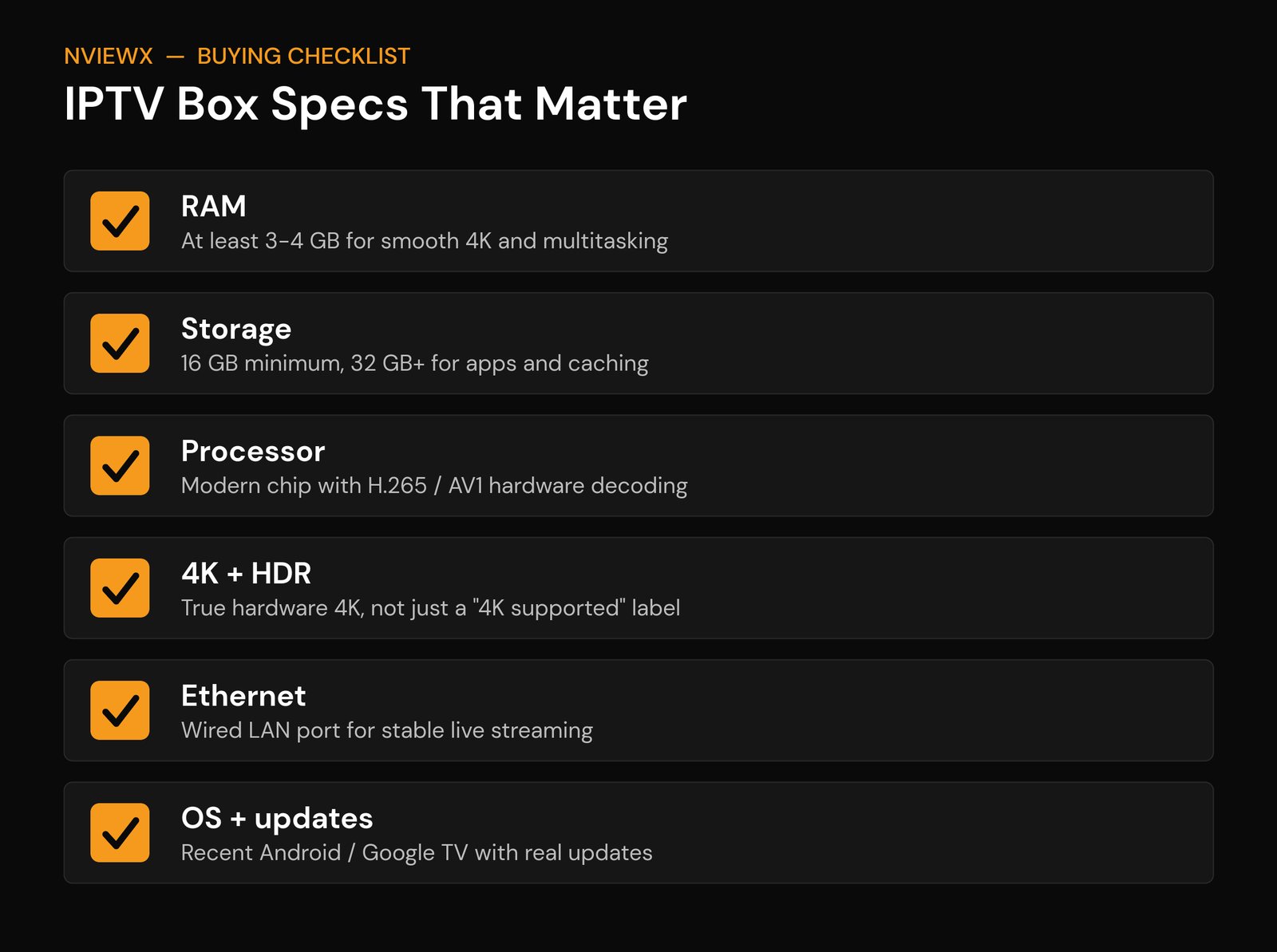
- RAM: aim for 3 to 4 GB. 2 GB scrapes by for HD; 4 GB keeps the EPG, the app, and 4K playback smooth at once.
- Storage: 16 GB is the floor, 32 GB or more is comfortable once you add apps, caching, and updates.
- Processor: look for a modern chip (for example Amlogic S905X4 or a current Rockchip) with hardware H.265/HEVC and ideally AV1 decoding. Without hardware decoding, even a fast CPU stutters.
- True 4K and HDR: “supports 4K” on the box doesn’t mean the chip can decode 4K smoothly. Check for genuine hardware 4K and HDR support, not just a label.
- Ethernet port: a wired gigabit port is the single best upgrade for stable live streaming. Wi-Fi works, but Ethernet removes most buffering.
- OS and updates: a recent Android or Google TV build that actually receives updates means apps keep working and security holes get patched.
How to set up an IPTV box
Setup takes about ten minutes the first time. The short version: plug the box into HDMI and power, connect it to the internet (use the Ethernet port if you have one), run through the on-screen language and account setup, then install an IPTV player from the app store. Open the player, enter your service’s M3U URL or Xtream Codes login, let it pull the channels and guide, and you’re done.
For the full walkthrough with screenshots and the common gotchas, follow our step-by-step guide to setting up IPTV. If a channel won’t load, it’s almost always the source or your connection, not the box itself.
Is an IPTV box worth it?
For most people who watch a lot of live content, yes. A dedicated box gives you a faster interface, better 4K handling, a wired connection option, and the freedom to run the player you actually like instead of whatever your TV shipped with. If you only watch occasionally and your TV’s apps already work, you may not need one. And if budget is tight, a streaming stick gets you 90% of the way for a fraction of the price.
The one rule that never changes: a box is only as good as the service behind it, and only as legal as the content you point it at. Pair a solid box with a legitimate service and a stable connection, and it’ll quietly do its job for years. Nviewx can help you understand how the service side works so your setup stays reliable and above board.
Frequently asked questions
Do I need an IPTV box if I have a smart TV?
Not necessarily. If your smart TV runs the IPTV player you want and feels responsive, you can skip the box. People upgrade to a box when the TV’s apps are slow, missing, or get dropped, or when they want 4K and a wired connection.
Is an IPTV box the same as a Firestick?
Close, but not identical. A Firestick is a streaming stick that runs Fire OS (a version of Android) and plays the same IPTV apps. A box is usually more powerful, often has an Ethernet port, and frequently runs full Android with more app freedom.
Is using an IPTV box legal?
The box itself is completely legal; it’s just hardware. Legality depends entirely on the service you use. Stick to legitimate, properly licensed services and you’re fine. Avoid anything offering premium channels or events at a price that looks too good to be true.
What internet speed do I need?
Roughly 10 Mbps per HD stream and 25 Mbps or more per 4K stream. If several devices share the connection, add headroom. A wired Ethernet link to the box helps far more than raw speed alone.
Can I use an IPTV box without a subscription?
The box needs a content source to be useful. There are free, legal IPTV playlists (public broadcasters and free-to-air channels) you can load, but for a full channel lineup you’ll typically need a paid, legitimate service.
Do I need a VPN with an IPTV box?
A VPN isn’t required to make a box work. Some people use one for general privacy on their home network. It won’t make an illegal stream legal, so it’s no substitute for using a proper service.
Why does my IPTV box buffer?
Usually one of three things: a slow or congested connection, an underpowered chip struggling to decode the stream, or an overloaded source server. Switch to Ethernet, lower the stream quality, or check whether the issue follows one channel or every channel.