 Skip to content

Stalker Portal IPTV: Setup, MAC Login and Fixes (2026)
A stalker portal is an IPTV login method that identifies your player by its MAC address instead of a username and password. You enter one thing – a portal URL – and the provider’s server checks whether your device’s MAC address is on its list of active accounts. If it is, your live channels, on-demand library and TV guide load by themselves. There is no playlist file to download and no password to type.
It is the third of the three common ways an IPTV service hands you access, alongside M3U playlists and Xtream Codes logins – and easily the most confusing of the three, because the “account” is tied to a hardware ID most people have never looked at. This guide covers where portals come from, exactly how the MAC handshake works, which of your device’s IDs the provider actually needs, the stalker portal setup on each device, and how to fix the classic portal errors – including the one where a MAC-only portal suddenly asks for a username and password.
Where stalker portals come from
Stalker started life as middleware – the software layer that sits between a provider’s streaming servers and the box under your TV – built by Infomir, the company behind the MAG line of set-top boxes. MAG boxes don’t read playlist files at all. They boot straight into a portal: a server-rendered menu of live TV, movies and series that the provider controls entirely from their end.
In 2018 Infomir renamed the platform Ministra TV Platform (from version 5.3 onward), but the handshake never changed and almost everyone – providers included – still says “stalker portal”. If your service hands you a “portal URL” or a “Ministra address”, it is the same thing.
Two practical consequences follow from that history. First, the portal is provider-controlled: the layout, the categories and even the guide come from their server, so there is nothing to build or maintain on your side. Second, the login was designed for set-top boxes that have no keyboard – which is exactly why it uses the device’s MAC address rather than anything you type.
How the MAC address login actually works
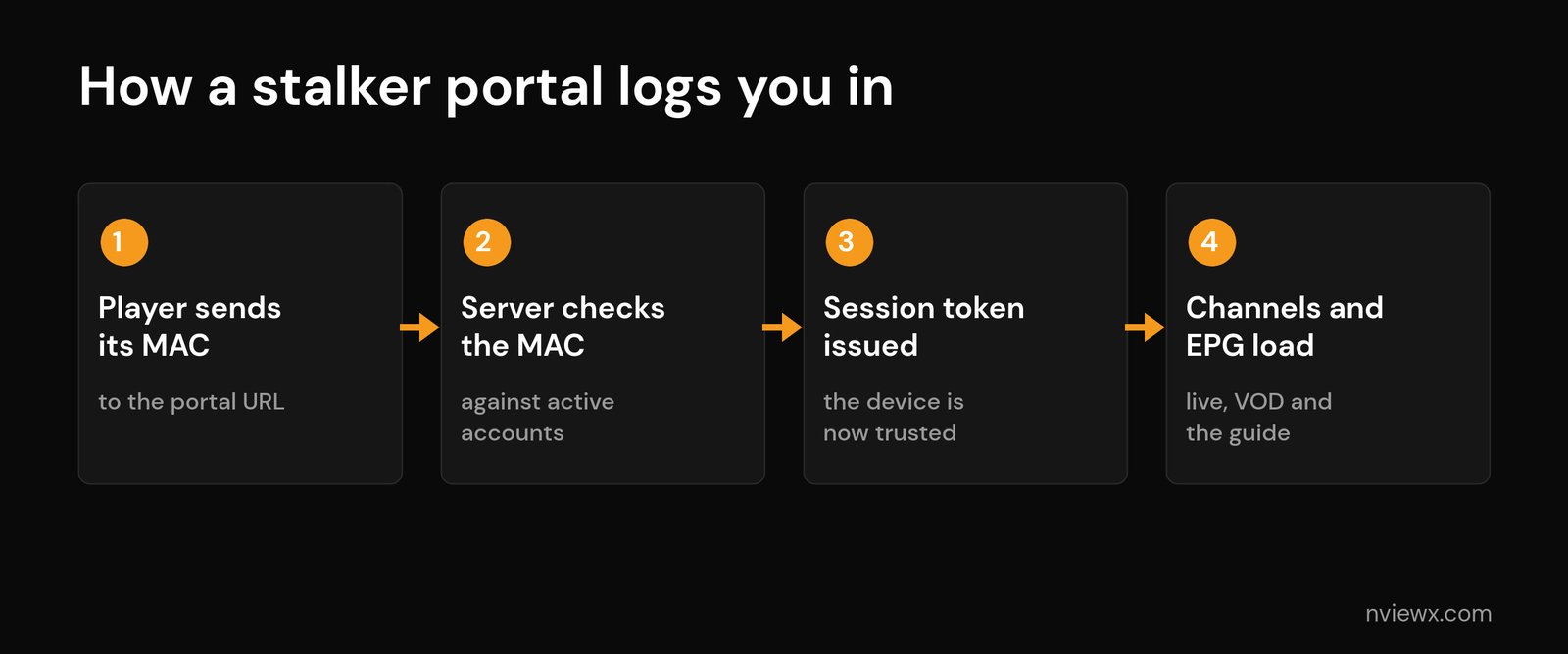
Every network device carries a MAC address – a 12-character hardware identifier that looks like 00:1A:79:2C:9F:41. A stalker portal uses it as the account key. The login runs in four steps:
- Your player contacts the portal URL and presents its MAC address.
- The server checks that MAC against the provider’s list of active, paid accounts.
- A session token is issued if the MAC matches – the device is now trusted.
- Channels, VOD and the EPG load from the server, already organised.
Here is the detail that trips almost everyone up: apps don’t use your real MAC. A portal-aware player generates a virtual MAC, almost always starting with 00:1A:79 – Infomir’s manufacturer prefix – so the server treats the app exactly like a MAG box. That virtual MAC lives inside the app. Reinstall the app and it usually generates a fresh one, which silently kills your login. The first portal setup I ever troubleshot failed for precisely this reason: the service was fine, the app was fine, but a reinstall had quietly changed the MAC and nobody had told the provider.
Because the MAC is the account, your provider has to register it before anything works. When you buy a portal-based subscription you either send them the MAC shown in your app, or they issue one for you to enter manually. A single mistyped character here is the most common reason a brand-new portal setup fails.
Portal URLs follow a recognisable shape: http://portal.example.com:8080/c/. That trailing /c/ path matters – many players won’t connect without it, and it is the first thing to check when a portal refuses to load. Not every provider uses it, though: some working portal URLs end without /c at all, so copy the address exactly as issued rather than adding or trimming anything. And if the address arrived together with a username and password, it is almost certainly an Xtream Codes API URL, not a portal.
Which MAC do you give your provider? The two-ID trap
On a phone or streaming-stick app there is only one identity to worry about: the virtual MAC the app shows you. Dedicated IPTV boxes are different, and this is where most “it should work but it doesn’t” portal tickets come from. Many boxes carry two identifiers – the ordinary network MAC of the Ethernet or Wi-Fi chip, and a separate portal MAC-ID that the box presents to stalker servers. Both look like 00:xx:xx:xx:xx:xx, both can be printed on the label, and only one of them is what the portal will see.
Formuler is the clearest example. Its official support article for the Z11 series says the ID to give your provider is the MAC-ID starting with 00:1E:B8, shown in MYTVOnline 3 under Content Manager > Content Sources > Add Portal and on the label on the back of the box. Older MYTVOnline models label a portal ID beginning 00:1A – the same prefix the MAG-style apps use. Hand your provider the network MAC by mistake and the server simply does not recognise the box.
What that failure looks like is the confusing part. On Formuler’s own support forum, the owner of a Z10 Pro reported that two different new providers both threw up a username-and-password screen on what should have been a MAC-only portal. The fix was not a setting at all: he had registered the box’s network MAC, and once he gave the provider the portal ID from the label, the login screen vanished. Another owner on the same thread hit the mirror image – a provider panel that refused the box ID and only accepted the real MAC. So the rule is not “always use one or the other”. It is: open the portal screen on the device you will actually watch on, read the ID it displays there, and register exactly that one. If you are unsure, send your provider both and ask which one they activated.
Stalker portal vs M3U vs Xtream Codes
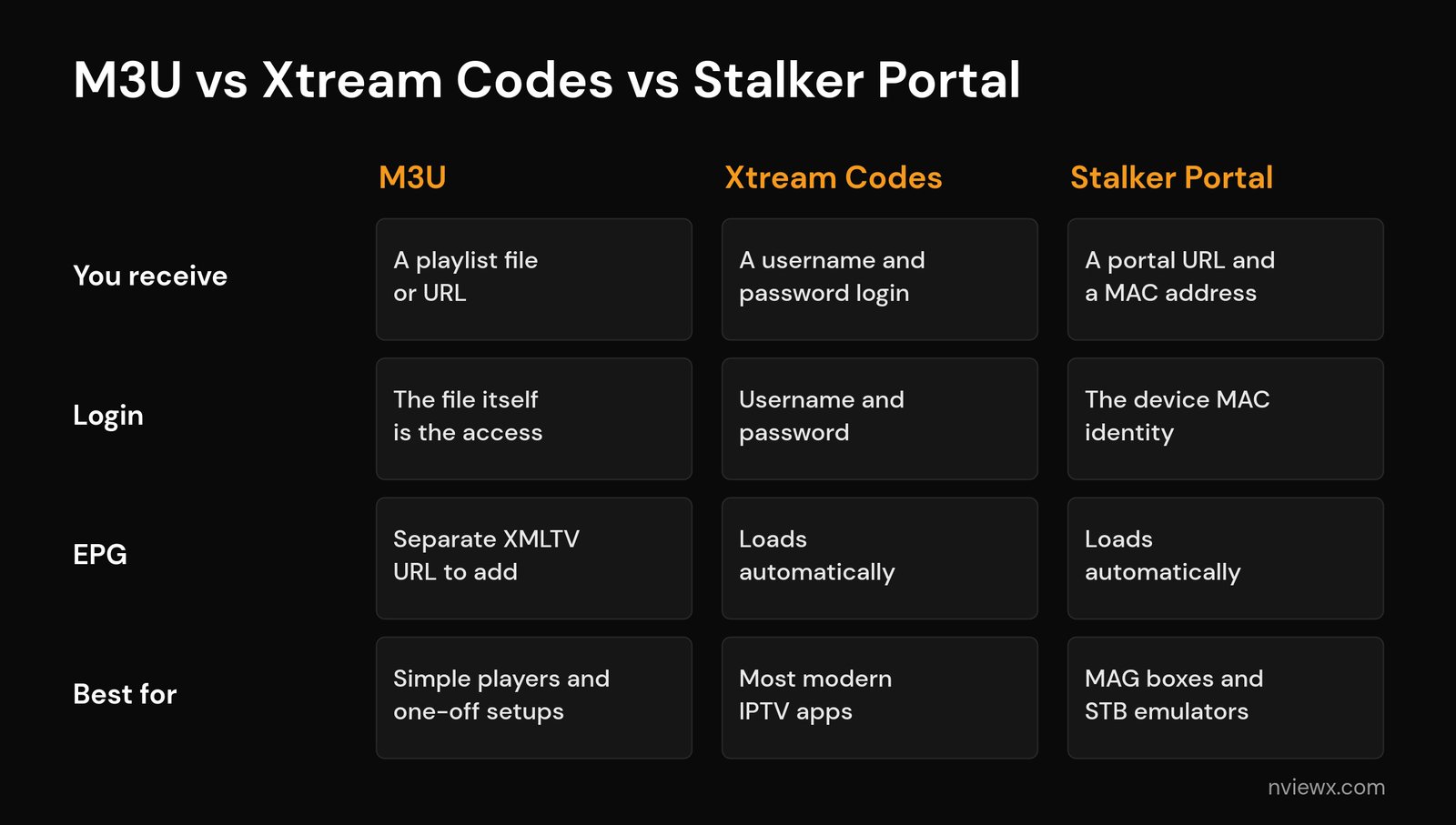
All three methods deliver the same streams in the end – what changes is what you hold in your hand and how easily you can move it between devices.
| M3U | Xtream Codes | Stalker portal | |
|---|---|---|---|
| You receive | A playlist file or URL | Username, password and server URL | A portal URL plus a registered MAC |
| Login | None – the file itself is the access | Username and password | The device’s MAC identity |
| EPG | Added separately as an XMLTV URL | Loads automatically | Loads automatically |
| Moving to a new device | Paste the URL again | Log in again | Provider must register the new MAC |
| Best for | Simple players and one-off setups | Most modern IPTV apps | MAG boxes and STB emulators |
The portal’s strength is zero maintenance: nothing expires in a file, no password to forget, and the provider fixes guide problems server-side. Its weak point is flexibility. With an Xtream Codes login you can be running on a new device in under a minute; with a portal, every device change goes through the provider’s support desk.
Stalker portal setup on each device
On a MAG box, the portal is native. Go to Settings, then System settings, then Servers, then Portals; enter a portal name and the portal URL, save and reboot. The box’s real MAC is printed on the sticker underneath – that is the one your provider registers. If you are still choosing hardware, our MAG box vs Firestick vs Android TV box comparison covers where a dedicated IPTV box makes sense.
On a Formuler box (MYTVOnline 3), open Menu > Content Manager > Content Sources > Add Portal. Give the portal a nickname, paste the portal URL, leave the ID and password fields empty, and press Connect. The same screen shows the MAC-ID your provider needs, so read it there rather than from the network settings. On older MYTVOnline versions the equivalent switch is called “Login required” – leave it off for a MAC portal, because switching it on is what makes the app ask for a username. If you are still deciding whether the hardware is worth it, our Formuler IPTV box review weighs it against cheaper options.
On Android, Fire TV or Android TV, STB emulator apps imitate a MAG box in software. The app shows its virtual MAC on the start screen or in its profile settings – send that value to your provider, add the portal URL in the same profile screen, then restart the app.
One thing the quick guides skip: a full STB emulator profile has more fields than the MAC – a serial number, a device ID, a second device ID and a signature. Most portals only check the MAC, so the rest can stay at their defaults. Some provider panels, though, lock a line to the whole set. If a portal works on your original box but fails in an emulator using the identical MAC, that lock is the likely reason, and the fix is to ask the provider to register the emulator as a device – not to copy identifiers from somewhere else.
In TiviMate and IPTV Smarters Pro, portal support is built into two of the most popular IPTV player apps. TiviMate offers “Stalker portal” as a source type when you add a playlist; IPTV Smarters Pro has a “Login with Stalker Portal” option on its start screen. Both display the virtual MAC they generated so you can pass it to the provider. If you are weighing those two players against each other, see our TiviMate vs IPTV Smarters comparison.
Whatever the device, the sequence is the same three moves: get the portal URL from your provider, make sure the exact MAC your device shows is registered on your account, then enter the URL and restart the app. For a broader walkthrough of first-time setup on any hardware, start with our IPTV setup guide.
Portal errors and how to fix them
Portal problems are nearly always identity problems – the server does not recognise the MAC knocking on its door. Work through these in order:
| Symptom | Likely cause | Fix |
|---|---|---|
| “MAC not registered” or “STB blocked” | The MAC is not on your account, or one character is wrong | Copy the exact MAC from the app screen and send it to your provider |
| Portal stuck on loading, or a blank screen | Wrong portal URL – usually the missing /c/ path | Re-enter the full URL exactly as issued, including port and /c/ |
| Worked for months, dead right after a reinstall | The app generated a new virtual MAC | Send the new MAC to your provider to re-register, or restore the old one if the app allows it |
| “Account expired” message | The subscription has lapsed | Renew, then force-close and reopen the app – more in our guide to an expired IPTV subscription |
| A second device won’t connect | Each device needs its own registered MAC, and plans cap simultaneous streams | Register the second MAC and check your plan’s connection limit |
| Asks for a username and password on a MAC portal | The URL is really an Xtream Codes API address, “Login required” is switched on, or the provider registered a different ID from the one your box shows | Switch “Login required” off, ask whether you were sent a portal or an XC API URL, and confirm which ID they activated |
| “STB blocked” straight after a factory reset or a new box | The line is still tied to the old device, or to the other of the box’s two IDs | Send the ID shown on the portal screen now and ask the provider to move the line to it |
If the portal connects but playback misbehaves – channels open and then stutter, or the guide stays empty – the fault is usually not the portal at all. If the app reports a timeout before the portal even answers, work through our IPTV connection timed out fixes first. Start with our guide to IPTV error codes and DNS issues, and if you are being rejected with a login-style error on an Xtream setup, that is a different animal covered in IPTV authorization failed fixes. A blank guide on a working portal is provider-side; on M3U setups it is usually an EPG configuration problem.
Why “free stalker portal” lists stop working
Search for stalker portals and you will quickly find pages offering a portal URL with a list of MACs, or a “MAC generator”. Once you know how the login works, it is obvious why these die within days. A portal only authorises MACs the operator has registered against a paid line. A generated MAC that nobody registered is refused on the first request. A MAC that does work belongs to someone’s paid account – so you are sharing a line with a stranger, the connection limit kicks one of you off, and the operator revokes it as soon as the extra connections show up. Meanwhile your device is talking to a server run by whoever posted the list, which is the same bargain described in our guide on whether free IPTV is safe.
So which should you use?
If your provider gives you a choice and you run a normal player app, pick Xtream Codes – it is the most portable and the easiest to move between devices. Pick the stalker portal when you use a MAG box or an STB emulator, or when your provider is portal-first and their portal interface is simply better maintained than their playlist output. Keep M3U for simple players and custom setups. None of the three is “better” outright; a portal is just a login built for a keyboard-less box, and it shows.
Frequently asked questions
Is a stalker portal the same as Ministra?
Yes. Infomir renamed Stalker Middleware to the Ministra TV Platform at version 5.3 in 2018. The login handshake is unchanged, and providers use the two names interchangeably.
Do I need a MAG box to use a stalker portal?
No. Any portal-aware app – an STB emulator, TiviMate, IPTV Smarters Pro and others – generates a virtual MAC starting with 00:1A:79 and logs in exactly like a MAG box would.
Why does my portal say “MAC not registered” or “STB blocked”?
The server does not recognise your device’s MAC: it was never added to your account, one character was mistyped, or your app generated a new virtual MAC after a reinstall. Send the exact MAC shown in the app to your provider.
Why does my stalker portal ask for a username and password?
A true MAC portal never needs one. The pop-up usually means the address you were given is an Xtream Codes API URL rather than a portal, “Login required” is switched on in the app, or your provider registered a different ID from the one your box shows on its portal screen.
Where do I find the MAC-ID on a Formuler box?
On the Z11 series with MYTVOnline 3 it is shown under Content Manager > Content Sources > Add Portal and printed on the label on the back. It starts with 00:1E:B8, and it is the ID to give your provider – not the network MAC.
Can I use the same portal on two devices at once?
Not with one MAC. The MAC is the device identity, so each device needs its own registered MAC on the account, and how many can stream at the same time depends on your plan’s connection allowance.
Are stalker portals legal?
The technology is neutral – it is standard middleware used by licensed operators worldwide. What matters is whether the service behind the portal holds licences for what it streams; see our guide on whether IPTV is legal for the four checks that tell a licensed service from a pirate one.






