Skip to content
Internet Speed for IPTV: How Much Do You Need? (HD & 4K, 2026)
Short answer: the internet speed for IPTV you actually need is about 10–15 Mbps for a Full HD stream and 25 Mbps or more for 4K, with roughly 3–4 Mbps enough for standard-definition live TV. Those numbers are per screen — run two or three at once and you add them together. And here is the part that catches most people out: the headline speed on your plan is only half the story. A “fast” connection that is unstable will still stutter, and that trips up far more viewers than a genuinely slow one.
Below you’ll find the exact per-quality numbers, how to size a plan for a busy household, how to test the speed you really have, and why a 300 Mbps line can still freeze at 9pm.
The quick numbers: speed per stream by quality
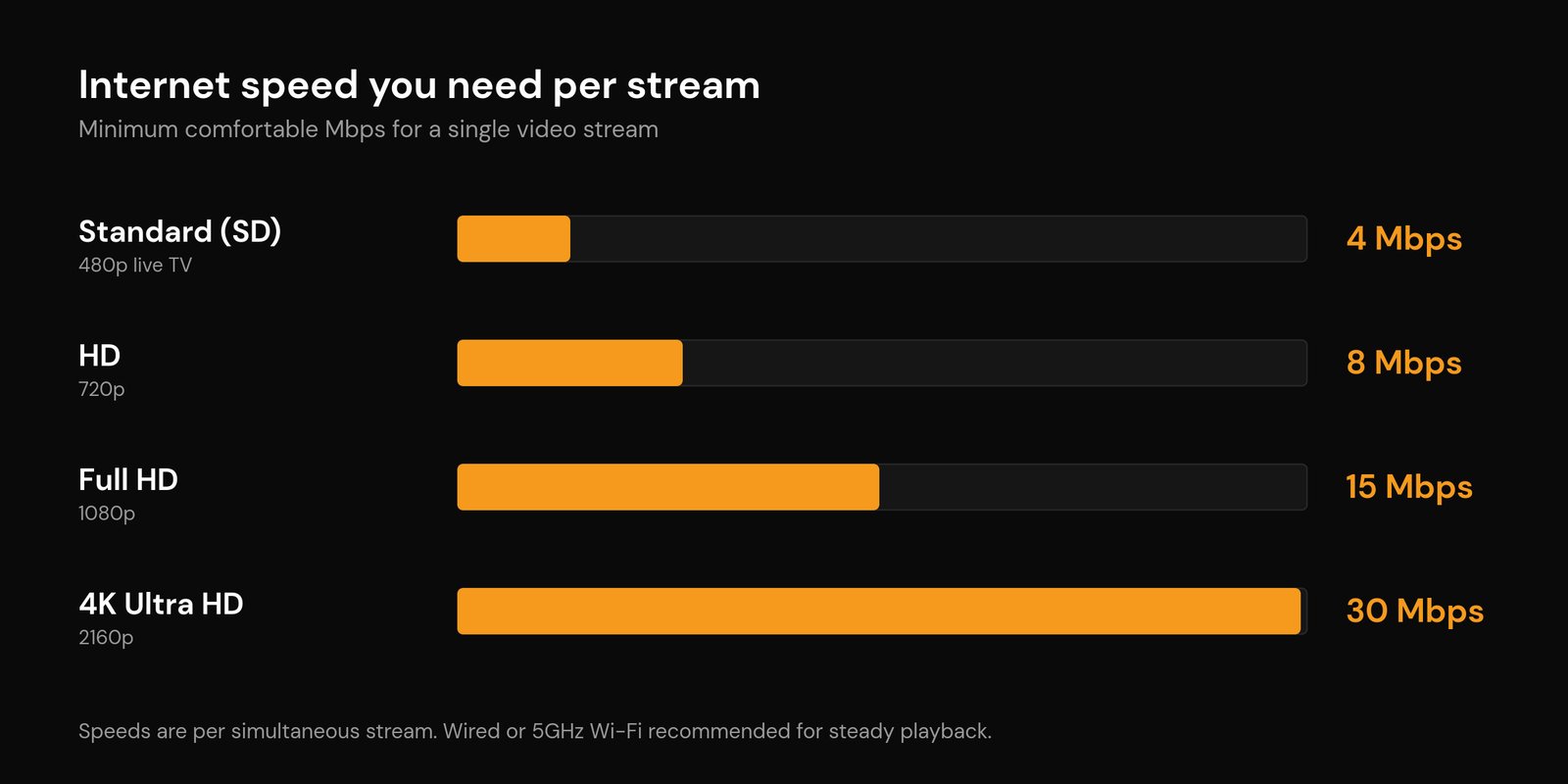
Video is just data moving every second, measured as a bit rate. Higher resolution and frame rate push more data, which means more megabits per second. Here is what a single IPTV stream needs:
| Picture quality | Resolution | Bare minimum | Comfortable (plan for this) |
|---|---|---|---|
| Standard (SD) | 480p | 3 Mbps | 4 Mbps |
| HD | 720p | 5 Mbps | 8 Mbps |
| Full HD | 1080p | 8 Mbps | 10–15 Mbps |
| 4K Ultra HD | 2160p | 20 Mbps | 25–35 Mbps |
The “comfortable” column is the one I’d actually plan around. Minimums work on a perfect connection with nothing else going on; the extra headroom is what absorbs a busy router or a noisy Wi-Fi channel without the picture collapsing. 4K is the unforgiving one — it carries roughly four times the pixels of 1080p, so a stream hovering near its 20 Mbps floor has almost no slack when the network hiccups.
It’s per stream, not per household
This is the number people forget. Everything above is for one screen. Each extra device watching at the same moment stacks on top of the last. A 4K feed on the living-room TV (call it 30 Mbps) plus a Full HD stream on a tablet (15 Mbps) is already 45 Mbps of video before anyone opens a browser tab or a phone starts a background backup.
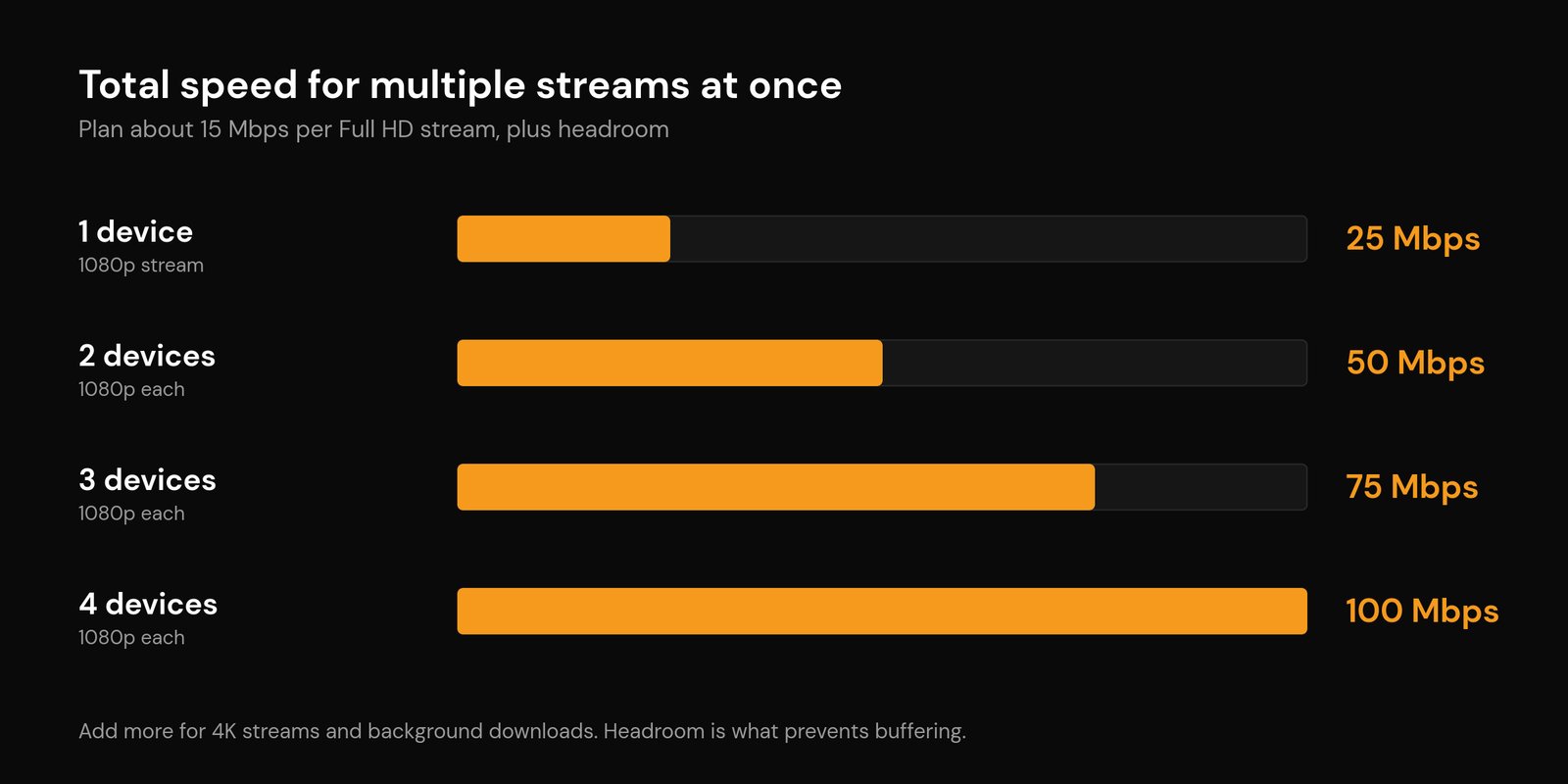
So size your plan for the busiest moment in your home, not the average one. Here’s a rough guide for simultaneous Full HD streams:
| Watching at once | Plan for roughly |
|---|---|
| One 1080p stream | 25 Mbps |
| Two 1080p streams | 50 Mbps |
| One 4K + one 1080p | 50 Mbps |
| Three 1080p streams | 75 Mbps |
| Four 1080p streams | 100 Mbps |
Why budget 25 Mbps for a 1080p stream that technically only needs 15? Headroom again. Real homes have phones syncing photos, consoles downloading updates, and smart-home gadgets chattering in the background. That spare capacity is the difference between a steady picture and one that drops every time the network gets busy.
Why a fast connection still buffers
Plenty of people pay for 200–500 Mbps and still get the spinning wheel during the big match. Speed is necessary but not sufficient. The things that actually break playback are usually these:
- Instability and packet loss. A connection that briefly drops packets makes the stream re-buffer even when the average speed looks huge. Consistency matters more than the peak number.
- Latency and jitter. If the delay between you and the server keeps changing, the player runs out of buffered video and pauses. A line can be fast and jittery at the same time.
- Wi-Fi, not the internet. The weak link is very often the last few metres of wireless, not your broadband. A 5GHz signal in the same room behaves completely differently from a 2.4GHz signal two walls away. Our guide to the best Wi-Fi settings for IPTV covers the band, channel width, and placement tweaks that fix most of it.
- Peak-hour congestion. Evenings are rush hour for the internet. When your neighbourhood, your provider, or your home network all get busy at once, network congestion throttles real throughput well below your headline plan.
- The source server. Sometimes it isn’t you at all — an overloaded provider server stutters for everyone on it, which is why a stable, well-run service is worth more than a few extra megabits.
If a speed test looks fine but the stream still freezes, the culprit is almost always one of these rather than the raw number. Work through them in order with our walkthrough on how to fix IPTV buffering.
Wired beats Wi-Fi every time
If the streaming device is anywhere near the router, run an Ethernet cable to it. A wired link is steadier, lower-latency, and immune to the interference that makes wireless stutter — it’s the single biggest upgrade for a flaky picture. When a cable isn’t practical, get on the 5GHz band and keep the device in line of sight of the router. One quick diagnostic: if a stream plays perfectly on your phone’s mobile hotspot but chokes on home Wi-Fi, the speed isn’t the problem — the home network is. We unpack exactly that in why IPTV works on a hotspot but not Wi-Fi.
How to check the internet speed you actually have
Don’t guess from your plan’s advertised number — measure what reaches the screen, at the time it struggles:
- Run a speed test on the device you stream with (or one sitting right next to it), not on a laptop wired to the router. The result on the actual device is the one that matters.
- Test in the evening when things buffer, not at 10am when the network is quiet. Peak-hour numbers tell the real story.
- Note three figures: download speed, and if the tool shows them, latency (ping) and jitter. Low, steady ping is as important as a big download number.
- Compare against the household total in the table above. If you’re under it, that’s your answer. If you’re well over it and still buffering, the problem is Wi-Fi, stability, or the source — not the plan.
Coming up short? Quick wins
- Drop the stream quality a notch in your player settings — Full HD instead of 4K is a huge data saving and often indistinguishable on a smaller screen.
- Wire the device with Ethernet, or move it onto 5GHz and closer to the router.
- Reboot the router, and pause any big background downloads or backups while you watch.
- Switch to a faster, more reliable DNS if channels are slow to load — see IPTV error codes and DNS issues for how.
- If you’re consistently below the numbers for your household, it may genuinely be time for a faster plan. New to all this? Start with how to set up IPTV and what an IPTV service is.
Frequently asked questions
Is 100 Mbps enough for IPTV?
For almost every home, yes. 100 Mbps comfortably handles four simultaneous Full HD streams, or a 4K feed plus a couple of HD ones, with room to spare for normal background use. You’d only outgrow it with several 4K streams running at the same time.
How much internet speed do I need for 4K IPTV?
Plan for 25–35 Mbps per 4K stream. The technical floor is around 20 Mbps, but 4K leaves so little slack that the extra headroom is what keeps it from dropping back to HD or buffering when the network gets busy.
Why does my IPTV buffer when my internet is fast?
Because raw speed isn’t the whole picture. Unstable Wi-Fi, packet loss, high jitter, evening congestion, or an overloaded provider server will all cause buffering on a connection that benchmarks fast. Test on the streaming device in the evening, and prioritise a wired or strong 5GHz link.
Does a higher internet plan stop buffering?
Only if a lack of speed was the actual cause. If you’re already comfortably above your household’s total need, paying for more megabits won’t help — the fix is on the Wi-Fi, stability, or provider side instead.
Is wired or Wi-Fi better for IPTV?
Wired, clearly. Ethernet is steadier and lower-latency, and it sidesteps the interference and signal drop-off that cause most wireless stutter. If you can only go wireless, use 5GHz and stay close to the router.