Skip to content
How to Set Up IPTV on a Samsung or LG Smart TV (No Box, 2026)
Short answer: you can run IPTV on a Smart TV with no extra box at all. Install an IPTV player app from your TV’s own app store, then either activate it with the TV’s MAC address or sign in with your M3U link or Xtream Codes login. On a Samsung (Tizen) set the usual route is the Smart IPTV app plus a quick online activation; on an LG (webOS) set you can grab a free player straight from the LG Content Store. Both take about five minutes once your subscription details are to hand.
Below is the full walkthrough for each platform, a side-by-side of how Samsung and LG differ, the two activation models you’ll run into, and fixes for the snags that trip most people up.
Do you actually need a streaming box?
Not if your TV is reasonably recent. Any Samsung running Tizen (2016 models and newer) or any LG running webOS 4.0 (2018 and newer) can install an IPTV player from its built-in app store and stream directly. A separate IPTV box or streaming stick is only worth it if your TV is older than that, if its app store no longer carries a player you like, or if you want the smoother interface and frequent updates that a dedicated device gives you. For everyone else, the TV you already own is enough.
The trade-off: Smart TV apps tend to update less often and the remote can feel clunky for big channel lists. They more than do the job, but if you later want a snappier experience, a cheap stick is the easy upgrade.
Before you start: what you need
Grab these before you touch the TV, because half the setup is just typing them in correctly:
- An active subscription with its connection details — either an M3U playlist URL or Xtream Codes (a server URL, username, and password). Your provider sends these by email when you sign up.
- The TV connected to the internet — ideally by Ethernet cable, or on the 5GHz band if you must use Wi-Fi.
- A phone or laptop handy, because some apps are activated from a website rather than on the TV itself.
- Your TV’s MAC address for the apps that use it — most show it on their own welcome screen, so you rarely need to dig through the TV settings.
How to set up IPTV on a Samsung (Tizen) Smart TV
Samsung’s Tizen platform is a closed system, so the well-known sideloaded players aren’t available here. Instead you use one of the apps in the Samsung App Store that activate online with your TV’s MAC address. The most-used option is Smart IPTV, and the flow looks like this:
- Open the Samsung App Store from the home screen (the apps row), search for an IPTV player such as Smart IPTV, IPTV Smarters, or SS IPTV, and install it.
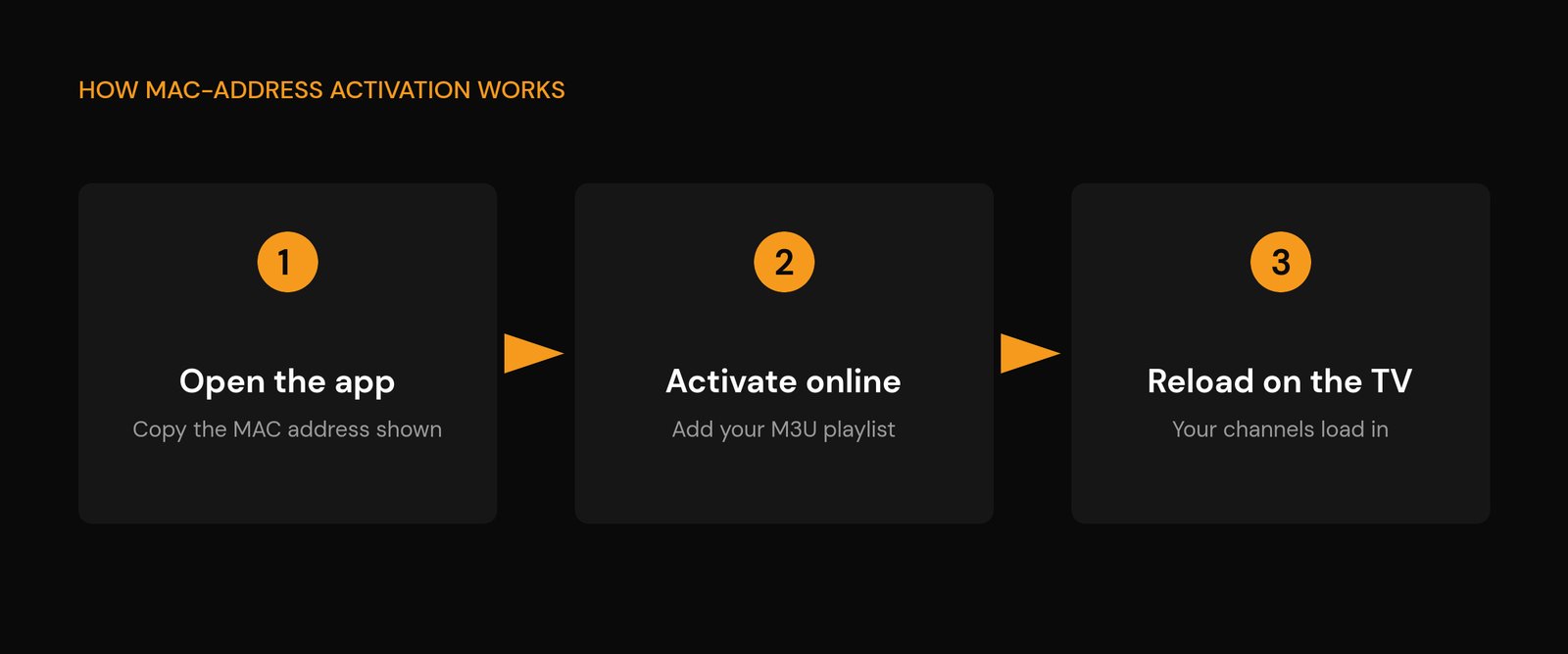
- Launch the app and note the MAC address it displays on the welcome screen (a string like 00:1A:2B:3C:4D:5E). Write it down exactly, colons included.
- On your phone or laptop, open the app’s activation page (for Smart IPTV that’s its official activation site). Enter the same MAC address and either paste your M3U URL or upload your playlist file.
- Save, then restart the app on the TV. Your channels and on-demand list load in. If a TV guide doesn’t appear, add your EPG link in the app’s settings — here’s how the IPTV EPG works.
One thing to know up front: Smart IPTV is free for a 7-day trial, after which it asks for a small one-time payment (around €5) to keep the MAC active. IPTV Smarters and SS IPTV are free alternatives if you’d rather avoid that — Smarters is the friendliest for beginners and takes an M3U or Xtream Codes login directly on the TV, no website step needed.
How to set up IPTV on an LG (webOS) Smart TV
LG’s webOS is a little friendlier here, because the LG Content Store carries several free players you can install and sign into right on the TV — no separate website for most of them:
- Press Home on the LG remote and open the LG Content Store.
- Search for an IPTV player — IPTV Smarters Pro returned to the store in 2026 and is free; SS IPTV and IBO Player are other reliable picks. Install the one you want.
- Open the app and add your playlist. Choose the M3U / remote-playlist option and paste your URL, or choose Xtream Codes and enter the server URL, username, and password.
- For MAC-based apps (like IBO Player), the app shows a MAC or device key on screen — enter that plus your playlist on the app’s activation site, then reload on the TV.
SS IPTV is the long-standing favourite on LG sets: it’s free, has a clean layout built for a TV remote, and takes an M3U URL in seconds. If you want EPG, catch-up, and a more app-like grid, IPTV Smarters Pro is the better all-rounder now that it’s back in the store.
Samsung vs LG: how the two compare
The end result is the same — live TV and on-demand content on the TV with no extra hardware — but the route there differs a little:
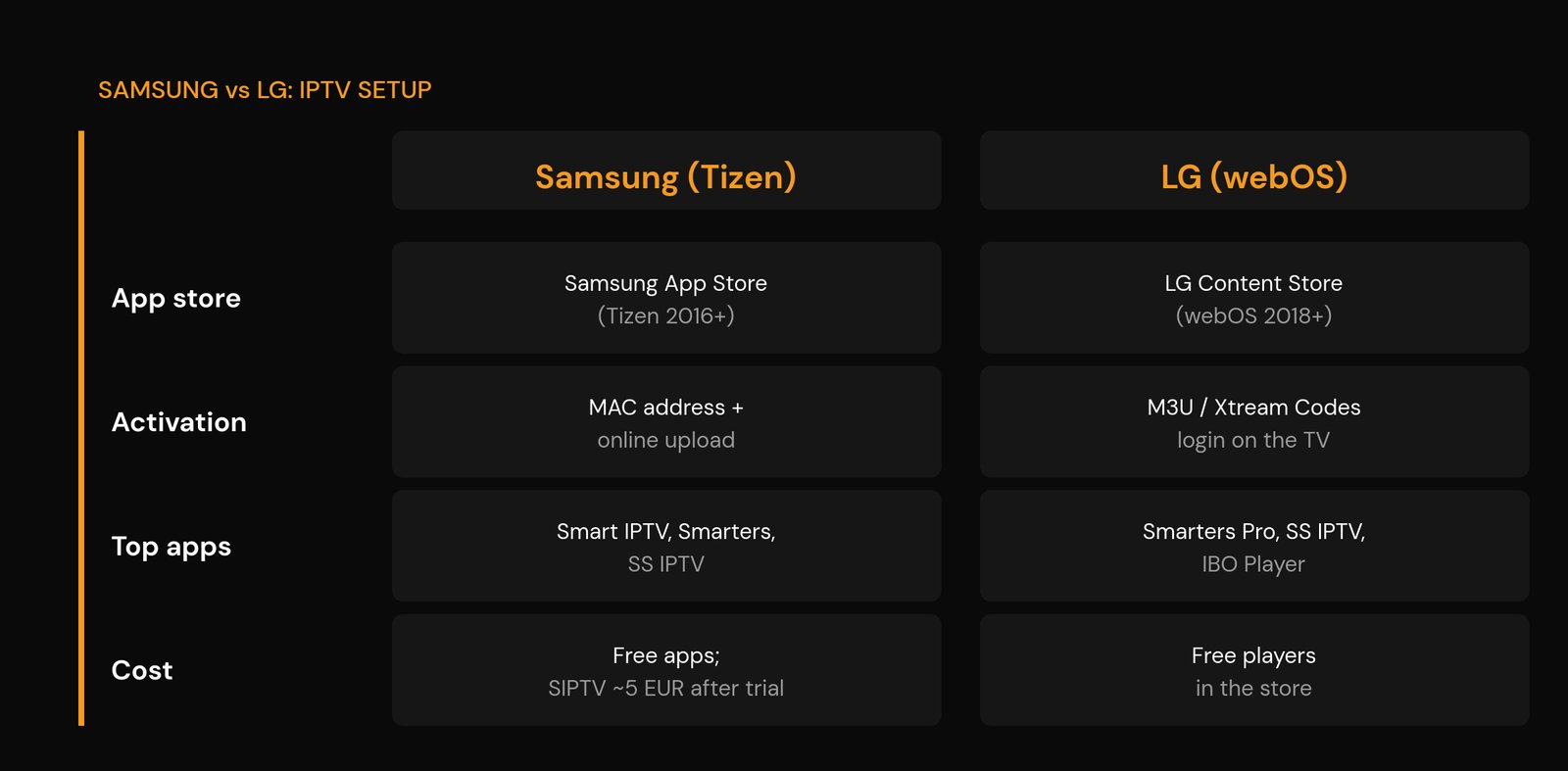
| Samsung (Tizen) | LG (webOS) | |
|---|---|---|
| App store | Samsung App Store (Tizen 2016+) | LG Content Store (webOS 4.0 / 2018+) |
| Usual activation | MAC address + online playlist upload | M3U or Xtream Codes login on the TV |
| Popular apps | Smart IPTV, IPTV Smarters, SS IPTV | IPTV Smarters Pro, SS IPTV, IBO Player |
| Typical cost | Free apps available; Smart IPTV ~€5 one-off after trial | Free players available in the store |
| Needs a phone/PC? | Often yes (for MAC activation) | Usually no |
The two activation models, explained
Almost every Smart TV player falls into one of two camps, and knowing which you’ve got saves a lot of confusion:
- MAC-address apps tie your playlist to the TV’s unique hardware address through the app maker’s website. You copy the MAC off the TV, register it online with your M3U, and the app pulls the list down. It’s a few extra steps, but the playlist sticks to that TV.
- Login apps skip the website entirely — you type your M3U URL or Xtream Codes straight into the app on the TV. Faster to set up, and Xtream Codes in particular keeps your login stable for the life of the subscription rather than expiring like a raw M3U link can.
If you have the choice, a login app with Xtream Codes is the lower-maintenance option. The MAC address route is only unavoidable on the apps built around it.
Common problems and quick fixes
- The app isn’t in my TV’s store. Your TV may be too old (pre-2016 Samsung / pre-2018 LG) or in a region where that app isn’t listed. Try another player from the store, or use a cheap streaming stick instead — see how to install IPTV on a Firestick.
- “Wrong MAC” or activation fails. The MAC is case-sensitive and easy to mistype — don’t confuse a zero (0) with the letter O, or a lowercase l with the number 1, and include the colons. Re-read it off the TV and try again.
- Channels load but keep buffering. That’s a network issue, not a setup one. Wire the TV with Ethernet or move to 5GHz, then work through how to fix IPTV buffering and dial in the best Wi-Fi settings for IPTV.
- No TV guide. Add your EPG URL in the app’s settings; if times look wrong, it’s usually a timezone setting in the app.
- Not sure which app does what. A quick primer on how IPTV player apps work clears up the differences between them.
New to all of this? Start with the device-agnostic how to set up IPTV guide, which covers the basics that apply to every platform.
Frequently asked questions
Can I use IPTV on a Smart TV without a box or stick?
Yes. Any Samsung Tizen TV from 2016 on, or LG webOS TV from 2018 on, can install an IPTV player from its own app store and stream directly. You only need a separate box if your TV is older or its store no longer offers a player you like.
How do I find my Smart TV’s MAC address for IPTV?
Most MAC-based apps show the address right on their welcome screen when you first open them, so you rarely need to look elsewhere. If not, it’s listed under your TV’s network settings, usually as the wired or Wi-Fi MAC. Copy it exactly, colons included.
Is Smart IPTV free on Samsung TVs?
It’s free for a 7-day trial, then asks for a small one-time payment (about €5) to keep your TV’s MAC activated. Free alternatives like IPTV Smarters or SS IPTV avoid that cost if you prefer.
Which is better for IPTV, a Samsung or LG Smart TV?
Both work well. LG’s webOS is slightly simpler because its store has free players you sign into on the TV, with no website step. Samsung more often uses MAC-address activation. The streaming quality itself depends on your provider and internet, not the TV brand.
Do I need an M3U or Xtream Codes for a Smart TV?
Either works. An M3U URL is a single link to your playlist; Xtream Codes is a username, password, and server URL. Login apps accept both, and Xtream Codes tends to stay valid longer, so it’s the more stable choice where your provider offers it.