 Skip to content
IPTV Buffering at Peak Hours: Causes & 9 Real Fixes (2026)
If your streams are flawless all day but IPTV buffering at peak hours ruins every evening — especially during big live sports events — while your speed test still looks healthy, the problem is almost never your device. It is congestion. Either your internet provider is quietly slowing streaming traffic during the nightly rush, or your IPTV provider’s servers are buckling under the load when everyone tunes in at once. The good news: you can prove which one it is in about a minute, and several of the fixes below take seconds. Here is exactly why it happens and the nine fixes that actually move the needle.
Why IPTV only buffers at peak hours, not all day
Between roughly 7 PM and 11 PM almost everyone is online at once — streaming, gaming, scrolling. That nightly surge creates network congestion, and a stream that sails through at 2 PM suddenly stutters at 9 PM even though nothing on your end changed. Two separate bottlenecks tend to bite at the same time:
- Your internet provider throttling streaming traffic. Many ISPs deliberately slow specific traffic types during peak hours to manage load. Your overall connection can still test fast while the stream itself is being held back.
- Your IPTV provider’s servers overloading. Budget services with thin server infrastructure run fine off-peak but choke between 7 and 10 PM, particularly during major live events when thousands of people hit the same feed at once. A well-resourced provider load-balances across servers and barely notices the spike.
The tell is the timing. If buffering only ever happens in the evening or during big live sports — and clears up by midnight — you are looking at congestion, not a broken setup. A device or app fault would misbehave at any hour.
First, confirm it is congestion and not your gear
Before changing anything, spend sixty seconds ruling out your own equipment so you fix the right thing:
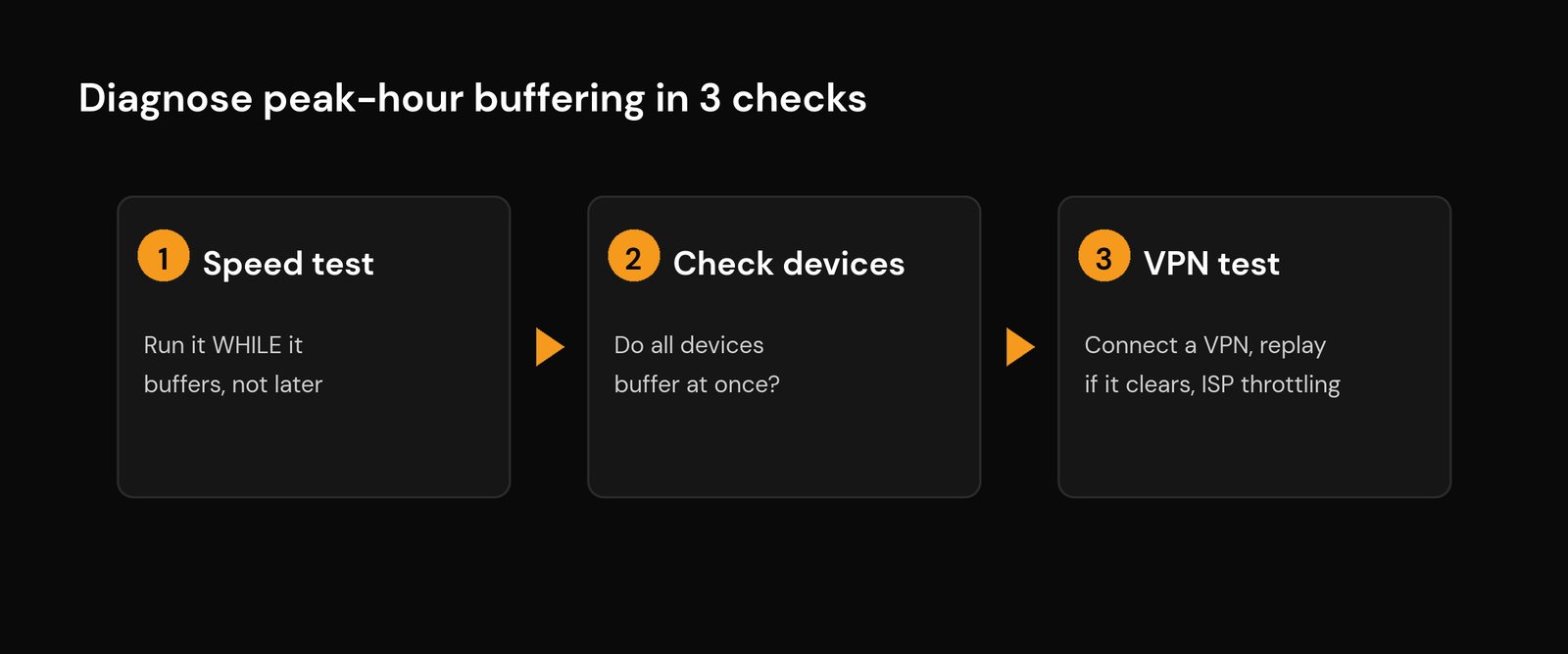
- Run a speed test while it is buffering, not the next morning. If your speed has collapsed at 9 PM but is fine at noon, the bottleneck is your line or your Wi-Fi. If the test still reads fast yet the stream stutters, suspect throttling or the provider’s servers. Our guide to the internet speed you really need for IPTV has the target numbers for HD and 4K.
- Check more than one device. If every device in the house buffers at the same time, the cause is your network or the provider. If only one stick or TV does it, the problem is that device — clear its cache or restart it first.
- Note the pattern. Every night at the same time points to peak congestion. Only during big live events points squarely at provider server load.
This quick table maps the symptom to the most likely cause so you know where to aim:
| What you see | Most likely cause | Where to fix it |
|---|---|---|
| Buffers every evening across all channels; speed test still fast | ISP throttling streaming traffic at peak | VPN test, then a VPN |
| Buffers only during major live events | Provider servers overloaded under load | Lower quality, backup line, or switch provider |
| Speed test also drops at peak | Local congestion or weak Wi-Fi | Ethernet, 5 GHz, router placement |
| Only one device buffers | That device or app, not the network | Clear cache, restart, raise buffer size |
The VPN test: the fastest way to expose throttling
This is the single most useful check, and it doubles as a fix. Bandwidth throttling works because your ISP can see that a connection is video and slow it down. Many providers use deep packet inspection to spot streaming traffic specifically, which is why a 200 Mbps plan can still stutter on one stream while everything else flies.
To test it, fire up a VPN during a buffering session and play the same channel again. If the stutter clears the moment the VPN connects, your ISP was throttling you — the encrypted tunnel hides what kind of traffic it is, so there is nothing for them to single out. If buffering is identical with the VPN on, throttling is not your problem and you can stop here and look at the provider instead. For the full picture on when a VPN genuinely helps and how to set one up without killing speed, see our guide on whether you need to get around IPTV restrictions.
9 fixes for peak-hour IPTV buffering
Work down this list roughly in order. The early ones are quick and address your own network; the later ones tackle throttling and provider overload.
- Wire the device with Ethernet. A cable sidesteps every Wi-Fi problem at once — interference, distance, and the evening crush of neighbouring networks. On a streaming stick, a cheap Ethernet adapter is the highest-impact upgrade you can make for peak-hour stability.
- Move to the 5 GHz band and closer to the router. The 5 GHz band is faster and far less crowded at peak than the congested 2.4 GHz one. Our best Wi-Fi settings for IPTV guide covers the exact channel and band tweaks that hold up when the whole street is online.
- Increase the buffer size in your player. Most serious IPTV apps let you raise the buffer or cache. A bigger buffer pre-loads more of the stream, so brief congestion dips get smoothed over instead of freezing the picture. It adds a second or two to channel changes — a fair trade in the evening.
- Change your DNS. If your ISP’s DNS is slow or overloaded at peak, channels are sluggish to start and switch. Pointing your device or router at a fast public DNS can tighten that up; our walkthrough on IPTV error codes and DNS issues shows how and when it actually helps.
- Restart the router and clear the app cache. A router that has been up for weeks accumulates congestion and heat; a reboot clears it. Clearing your player’s cache frees memory on low-RAM sticks without touching your playlist or login.
- Run a VPN to beat throttling. If the VPN test above cleared the buffering, keep it on during peak hours. Choose a fast modern protocol and a nearby server so you lose as little speed as possible.
- Lower the stream quality during the rush. When the provider’s servers are the bottleneck, dropping from 4K or FHD to HD asks for far less data per second and often plays smoothly while a higher-quality feed of the same channel stutters. Many players let you pick a lower-bitrate stream.
- Switch to a backup line or server. Good providers offer more than one server or line; some apps let you select an alternate. Moving off the overloaded node can be an instant fix during a big event. On the home side, a phone hotspot is a quick way to confirm the difference — if it streams fine on mobile data but not Wi-Fi, read why IPTV works on a hotspot but not Wi-Fi.
- Move to a reliable provider. If every fix above leaves you buffering only at peak and the VPN test came back clean, the servers are simply over-subscribed — no setting on your end can fix someone else’s hardware. The lasting cure is a properly resourced service. Our checklist on choosing a good IPTV provider shows what separates a load-balanced service from an oversold one.
When it is the provider, not you
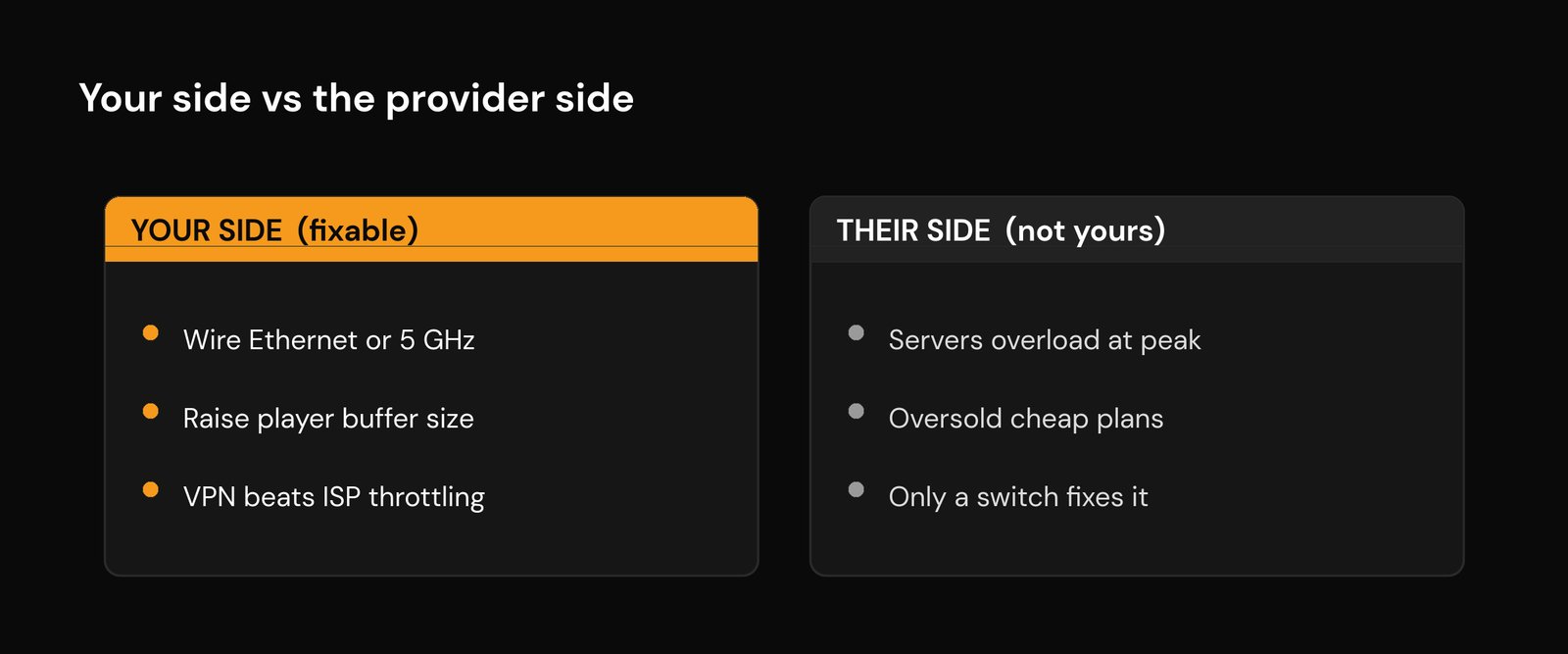
There is a hard limit to home-side fixes. If buffering only ever strikes during the biggest live events, when demand peaks for everyone at once, you have run into the provider’s ceiling. A thin operation that oversells cheap subscriptions cannot serve everyone at kickoff, and no buffer setting, DNS change, or VPN on your end adds capacity to their servers.
The practical move during the event is to lower the stream quality and try a backup server; the lasting move is to switch to a service that invests in load-balanced infrastructure. While you are reassessing, it is worth a quick read of how to avoid common IPTV risks and how to get a legitimate IPTV service the safe way so the provider you pick is reliable on every front, not just at peak.
Frequently asked questions
Why does my IPTV only buffer at night when my internet is fast?
Because a fast speed test does not mean your streaming traffic is getting through. During peak evening hours your ISP may be throttling video specifically, or your IPTV provider’s servers may be overloaded. Both slow the stream while your overall connection still tests fine. Run the VPN test to tell throttling apart from provider overload.
Does buffering during live sports mean my provider is bad?
Often, yes. If a service streams everything smoothly except during the biggest live events, its servers cannot handle the simultaneous demand. A well-resourced provider load-balances across multiple servers and holds up under that spike. Persistent buffering only at those moments is a sign the service is over-subscribed.
Will a VPN stop IPTV buffering at peak hours?
It will if the cause is ISP throttling. A VPN encrypts your traffic so the ISP cannot identify and slow the stream, which clears throttling-related buffering. It will not help if the buffering comes from the provider’s overloaded servers or from weak Wi-Fi — a VPN cannot add capacity that is not there. Use the VPN test first to find out.
How do I test whether my ISP is throttling IPTV?
Play a channel that is buffering, then connect a VPN and play the same channel again. If the buffering stops with the VPN on, your ISP was throttling the traffic. If it is unchanged, throttling is not the cause and you should look at your Wi-Fi or the provider’s servers instead.
Should I lower the video quality during peak hours?
Yes, it is one of the most reliable quick fixes when the provider’s servers are the bottleneck. Dropping from 4K or full HD to HD asks for much less data per second, so the stream is far more likely to keep up when capacity is tight. Many players let you choose a lower-bitrate version of the same channel.






