Skip to content


ISP Throttling IPTV: How to Prove It and Stop It
Short answer: ISP throttling IPTV traffic is real, but most buffering people blame on it is something else. Genuine throttling has a signature you can test for. Your speed test comes back fine, the stream still stutters, and switching on a VPN clears it up within seconds on the same channel at the same minute. If a VPN changes nothing, your ISP almost certainly is not the problem. Below is the twenty-minute test that tells you which one you are dealing with, and what to do about each.
This matters because “my ISP is throttling me” has become the default explanation for every stutter, and it sends people off buying subscriptions to fix a problem those subscriptions cannot touch. A VPN will not help a router sitting behind two walls. It will not help an oversold server. Test first, then spend.
What ISP throttling actually is
Bandwidth throttling is your internet provider deliberately capping the speed of some traffic. The important word is deliberately. It is a rule someone wrote, applied to traffic that matches a pattern, and it keeps applying whether or not the network is busy.
That is different from congestion, which is just too many people using the same pipe at the same time. Congestion is not aimed at you. It arrives at 8pm and leaves at midnight, and it hits everything equally.
To throttle a specific kind of traffic, an ISP first has to recognise it. There are a few ways they do that, and each one is easier or harder to work around:
- Destination. The simplest method. Traffic to a particular server address or network range gets a lower priority. No inspection needed.
- Port and protocol. Certain ports have historically been shaped on consumer plans. Streaming that runs over unusual ports is more exposed than streaming that rides ordinary web traffic.
- Deep packet inspection. The ISP examines traffic patterns and metadata to classify what it is carrying. Even when the content itself is encrypted, packet sizes, timing and the server name in the connection handshake give a strong hint that something is a continuous video stream.
Worth being clear about the limit here: an ISP classifying your traffic as video is not the same as it watching your video. We covered exactly where that line sits in what your ISP can and cannot see. Classification is enough to slow you down, and that is all throttling needs.
Throttling also shows up in shapes people do not expect. Some plans shape only after a monthly data threshold. Some mobile plans cap all video to a fixed resolution by design and say so in the contract. A few networks shape only during declared peak windows. None of those feel like a conspiracy, and all of them will make a live stream stutter.
Why people blame throttling when it is something else
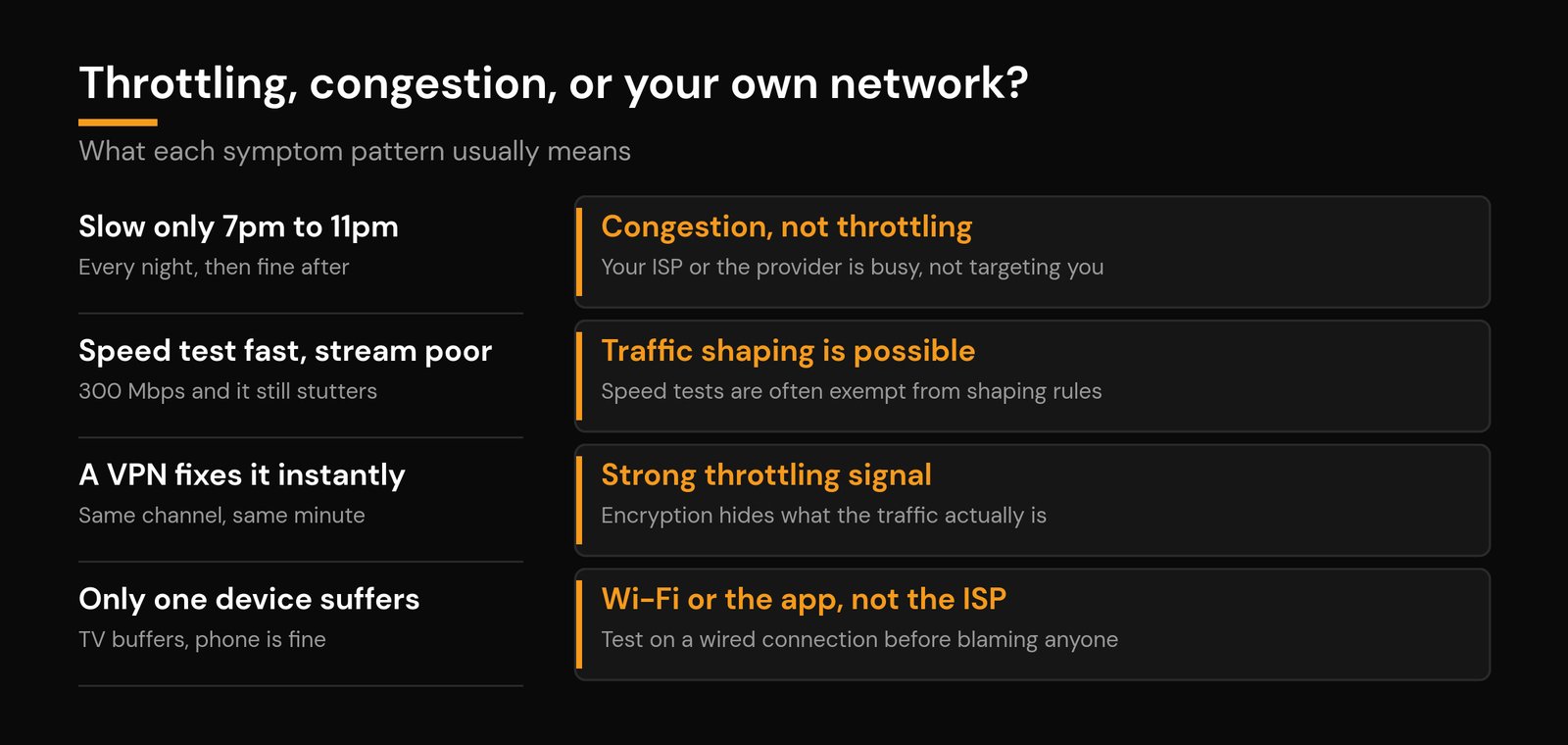
Four symptom patterns come up again and again in support tickets, and only one of them points at your ISP.
| What you see | Most likely cause | Check this first |
|---|---|---|
| Only stutters between roughly 7pm and 11pm, fine the rest of the day | Congestion, either on your ISP’s local segment or on the streaming server | Whether other households on your street report the same evening slowdown |
| Speed test says 300 Mbps, the stream still breaks up | Traffic shaping is plausible, because speed tests are frequently exempt from shaping rules | Run the A and B test below before concluding anything |
| A VPN fixes it instantly, every time, on the same channel | Strong throttling or blocking signal, because encryption removes the classification the rule depends on | That the improvement repeats on three separate nights, not once |
| The TV buffers but the phone on the same connection does not | Your own network or the app, not the ISP. A rule at the ISP cannot pick one device in your house | The same channel over a wired connection, and your Wi-Fi settings |
That last row is the one that ends most investigations. Throttling is applied at the connection level. It cannot distinguish your television from your phone, so if one device is fine and the other is not, the difference lives inside your house. Start with the router before you start with the provider.
How to prove it: the three-step test
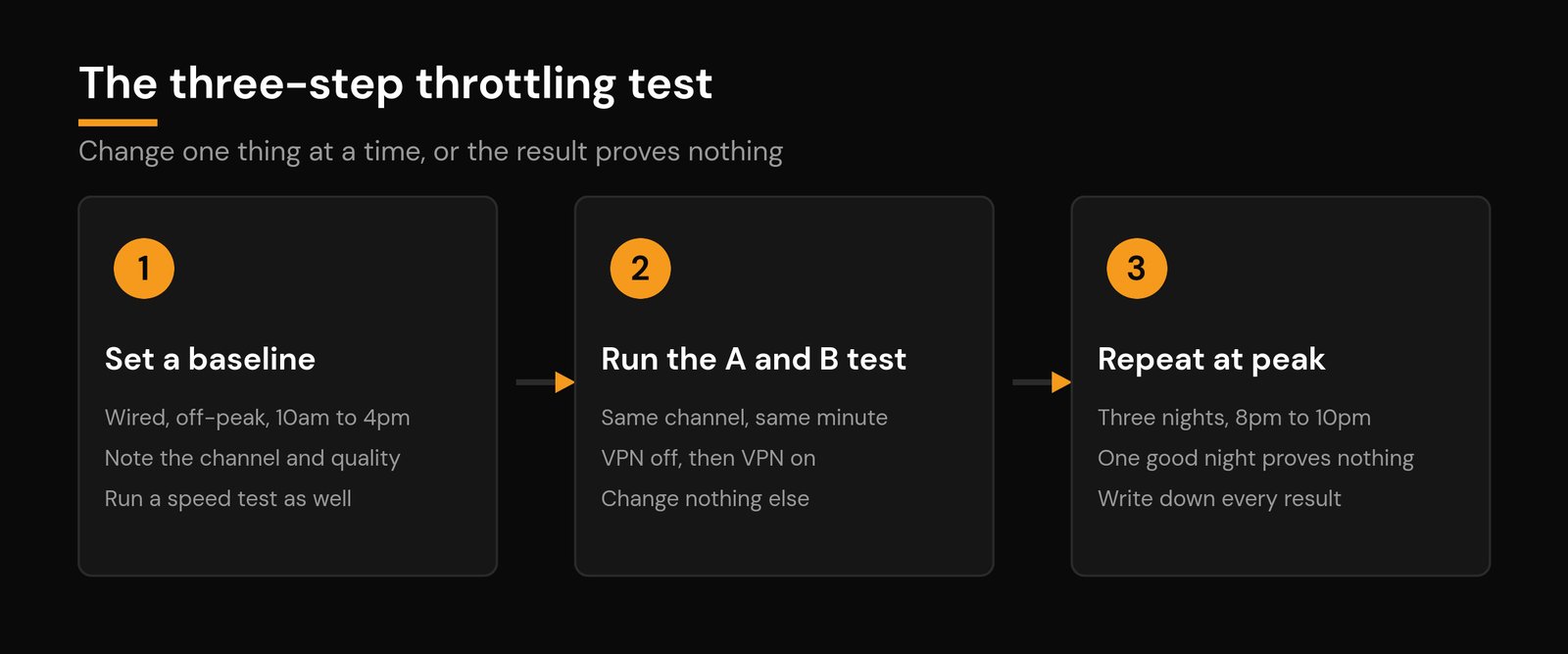
The whole test rests on one principle. Change one variable at a time, or the result proves nothing. Most people fail it by testing a VPN at 9pm on a busy Friday, seeing an improvement, and concluding throttling when they actually just watched congestion ease off.
Step 1: set an honest baseline
Pick a quiet window, somewhere between 10am and 4pm on a weekday. Connect the device by cable if you possibly can. Wi-Fi introduces a variable you cannot control, and half of all suspected throttling turns out to be a wireless problem once the cable goes in.
Now write three things down: the channel you tested, how the picture behaved over five uninterrupted minutes, and the result of an ordinary speed test. Compare that speed against what a stream actually needs. If you are only just clearing the requirement off-peak, you have found your answer already and it is not throttling.
Step 2: the A and B test
This is the part that carries the evidence. Open the same channel you baselined. Watch for three minutes with the VPN off. Turn the VPN on, reconnect to the same channel, watch for another three minutes. Do not change the app, the device, the quality setting or the room.
Two practical notes. Use a server that is geographically close to you, because a distant one adds enough latency to muddy the result. And expect a VPN to cost you some raw throughput even when it helps, since encryption has overhead. What you are looking for is not a higher speed test number. It is whether the stream itself holds together.
If you have never set one up, our guide to using a VPN with IPTV covers the settings that matter for this test.
Step 3: repeat at peak, three nights running
One clear night proves nothing. Networks vary. Run the same A and B comparison between 8pm and 10pm on three separate evenings and record each outcome.
Three nights is the smallest sample that separates a deliberate rule from a busy Tuesday. A rule is boring and consistent. Congestion wanders.
How to read your results
| Off-peak baseline | VPN on at peak | What it means |
|---|---|---|
| Clean | Fixes it on all three nights | Throttling or blocking is the best explanation. Your traffic is being treated differently once it can be identified |
| Clean | No change, or slightly worse | Not throttling. Look at congestion, the server you connect to, or your own equipment |
| Clean | Helps on one night out of three | Congestion, almost certainly. A rule would not take two nights off |
| Already stuttering off-peak | Anything | Start over. Something local or provider side is broken and throttling is not the question yet |
What to do if it really is throttling
A VPN is the practical workaround, and it is worth being honest that it is a workaround rather than a fix. It hides the classification the rule depends on, which is why it works. It also adds encryption overhead and an extra hop, so on a connection that was already marginal it can leave you no better off. Prefer a modern lightweight protocol and a nearby server, and test rather than assume.
Beyond that, three things genuinely help. Read your own plan, because shaping after a data threshold or a resolution cap on mobile is usually written into the contract and is not negotiable. Ask the provider directly and in writing, since some are straightforward about which categories they shape. And if you have a competitor available on your street, switching carrier is the only remedy that removes the rule instead of hiding from it.
What does not help: changing your DNS. It is a common suggestion and it solves a different problem entirely, as we set out in the guide to whether DNS changes stop buffering. DNS resolves names. It has no say in how your traffic is prioritised afterwards.
What to do if it is not throttling
Most of the time it will not be, and that is good news, because the remaining causes are more fixable than a carrier policy.
If the trouble only appears in the evening, you are looking at load somewhere, and the walkthrough for buffering at peak hours works through both ends of that. If it is constant and equally bad on every device, take the general buffering checklist from the top. And if only one screen in the house misbehaves, the problem is in that room, not on the internet.
Is throttling even legal in 2026?
It depends entirely on where you live, and the picture in the United States changed recently.
In January 2025 a federal appeals court set aside the Federal Communications Commission’s 2024 order in full, holding that the agency lacked the statutory authority to impose those rules. Broadband is regulated as an information service again, and as of 2026 there is no federal rule preventing an American ISP from throttling a category of traffic. The background to that long argument is covered in net neutrality in the United States.
Several states kept their own protections. California, Washington, Oregon, Colorado and Vermont have comprehensive laws banning blocking, throttling and paid prioritisation for residential customers, and New York, New Jersey and Maine impose similar obligations through contracting rules or executive orders. In the European Union, open internet rules continue to prohibit throttling specific applications outside of narrow exceptions such as congestion management and legal orders.
Practically speaking, none of this helps you at 9pm tonight. It does tell you whether a complaint has any weight behind it, and in a state or country with active protections, a documented three-night test is a much stronger thing to file than a feeling.
Frequently asked questions
Does a VPN always stop ISP throttling?
No. It stops throttling that depends on identifying what your traffic is, which covers most consumer shaping. It cannot help if the cap applies to your whole line regardless of content, such as a plan that slows everything after a monthly data allowance, and it will not rescue a connection that was too slow to begin with.
Why does my speed test look fine while the stream buffers?
Speed tests are short bursts to well known measurement servers, and those servers are often exempt from shaping rules. A live stream is a sustained connection to a different destination for hours. The two measure very different things, which is why a fast test result alone never rules throttling out.
Can my ISP tell I am streaming if everything is encrypted?
It cannot read the content, but it can usually infer the type. Sustained packet sizes, timing patterns and the server name exchanged when the connection is set up are enough to classify traffic as continuous video. That inference is all a shaping rule needs to act on.
Is throttling more common on mobile data than home broadband?
Generally yes. Mobile plans much more often carry explicit video quality caps or reduced speeds after a data threshold, and these are usually stated in the plan terms rather than hidden. Check your contract before running any test on a mobile connection.
How long should the whole test take?
About twenty minutes of active testing, spread over four days. Roughly ten minutes for the off-peak baseline, then six minutes on each of three evenings for the A and B comparison. Rushing it into one session is exactly how people reach the wrong conclusion.
Related guides
- IPTV buffering at peak hours: causes and real fixes
- Can your ISP see your IPTV? What it can and cannot track
- Internet speed for IPTV: how much do you actually need?
- Do you need a VPN for IPTV? When it helps and how to set it up
- Best router for IPTV: what actually stops buffering
Written by the Nviewx team — we run a premium IPTV service and test setups daily across Firestick, Android TV, Apple TV, smart TVs and mobile. Last updated August 2026.