Skip to content


IPTV Server Location: Does Distance Cause Buffering?
Short answer: IPTV server location matters, but far less than most people assume. Distance adds latency — a few milliseconds per hundred miles — and live TV tolerates latency well. What actually breaks a stream is an overloaded server, a bad route between your ISP and that server, or not enough bandwidth reserved per viewer. A server two countries away with headroom will beat a local one that is oversold every single night.
This comes up constantly when people shop around. Someone sees a provider advertising “servers in your region” and assumes that is the deciding feature. Then they buy, and it still stutters at 9pm. Below is what server location genuinely changes, what it does not, and a three-minute test you can run before you hand over any money.
What “IPTV server location” actually means
When a provider says their server is in a particular country, they usually mean one of two different things, and the difference matters.
The first is the portal or panel server — the machine that answers your login, hands your app the playlist, and serves the guide data. It is small, it is quick, and its location barely affects picture quality. It affects how fast your app opens and how quickly the channel list loads.
The second is the edge server that carries the actual video. That is the one that decides whether your stream holds up. Larger operations do not run a single box; they run a distribution layer that pushes copies of each stream out to several machines and sends you to the one that is nearest or least busy. That is the same principle behind a content delivery network, and it is why a well-built service can feel local from three different continents.
So when you ask “where is the server?”, the useful follow-up is “which server am I actually pulling video from, and how many other people are on it right now?” Most support agents can answer the first part. The second is the one worth pushing on.
How much does distance really cost you?
Light in fibre travels roughly 200 km per millisecond, and real networks add switching delay on top. In practice, every 1,000 km of separation adds somewhere between 10 and 15 ms of round-trip time. That is the physics floor — no provider can beat it.
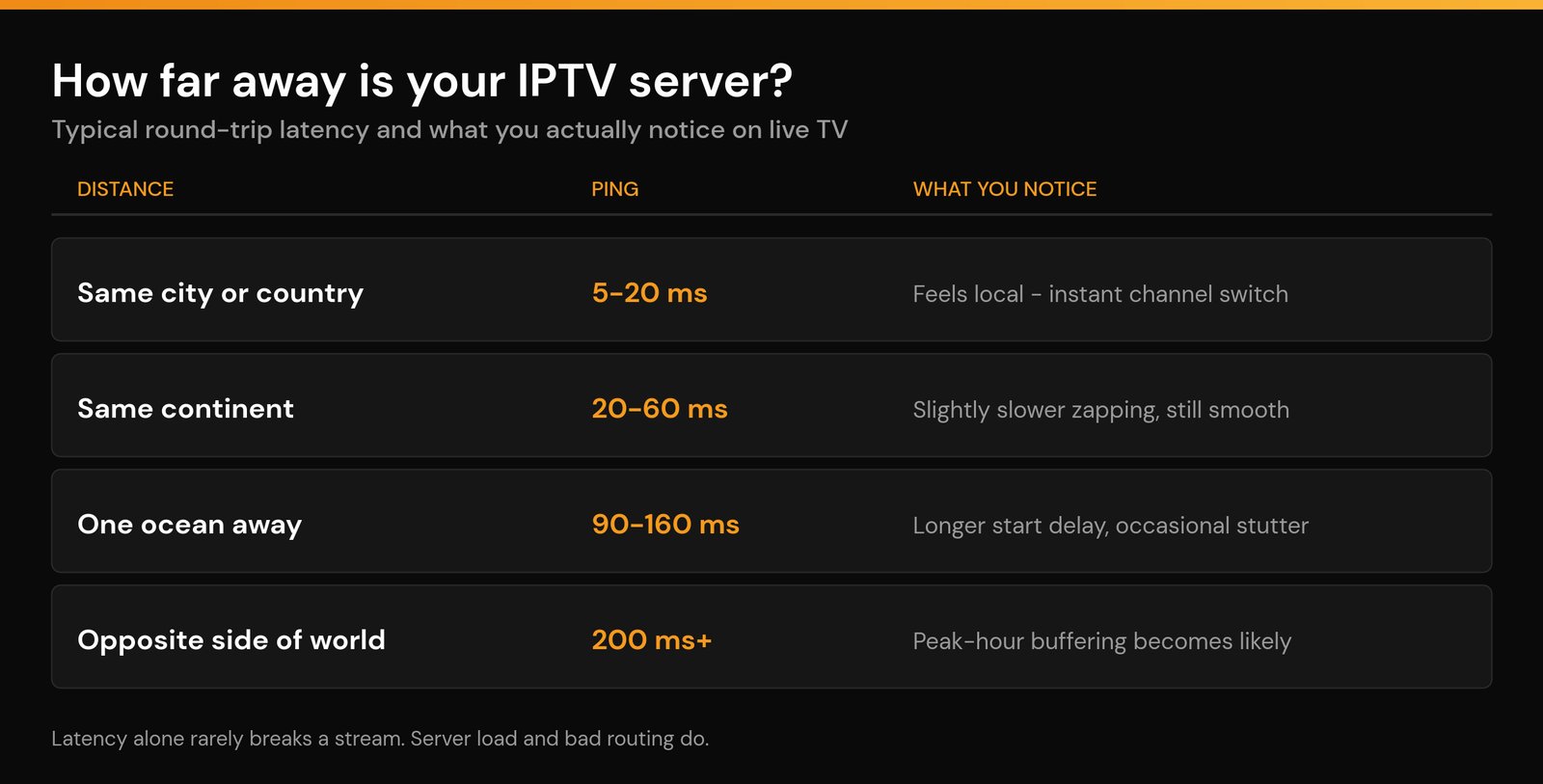
| How far the server is | Typical ping | What you actually notice |
|---|---|---|
| Same city or same country | 5–20 ms | Nothing. Channels open almost instantly. |
| Same continent | 20–60 ms | Zapping feels a fraction slower. Playback is identical. |
| One ocean away | 90–160 ms | Channel changes take about a second longer. Occasional stutter on a weak route. |
| Opposite side of the world | 200 ms and up | Noticeable start delay, and peak-hour buffering becomes likely. |
Read that table carefully, because it is the crux of the whole question. Up to about 100 ms, the only thing you feel is a slightly lazier channel change — the video itself plays fine, because your player buffers a few seconds ahead and latency does not shrink that buffer. Past roughly 150 ms, packet loss starts to compound: every lost chunk takes longer to re-request, and the buffer drains faster than it refills. That is where distance stops being cosmetic.
Live TV is also far more forgiving than gaming or video calls. A 120 ms delay on a live event means you see the goal a fraction of a second after someone on a local connection. It does not make the picture break up.
Routing beats raw distance
Here is the part providers rarely explain. Two customers the same distance from the same server can get completely different results, because their traffic takes different paths.
Your data does not fly in a straight line. It hops between your ISP, one or more transit networks, and finally the host. If your ISP has a direct peering arrangement near the server, you get a short, clean path. If it does not, your packets might route through a third country before doubling back — a detour that adds 60 ms and a congested hop for no geographic reason at all.
I have seen a subscriber 300 km from a server post a worse ping than someone 2,000 km away, purely because the closer one was on a budget ISP with poor transit. Distance was identical on a map and irrelevant in practice.
This is also why “just pick the nearest server” is bad advice when a provider gives you a choice of endpoints. Test two or three. The nearest one wins maybe two-thirds of the time; the rest of the time a slightly further endpoint with better peering is smoother.
Three things that hurt more than distance
Server load at peak. This is the number one cause, by a distance. A node sized for 500 concurrent viewers and sold to 900 will choke between roughly 8pm and 11pm regardless of where it sits. If your stream is perfect at 3pm and unwatchable at 9pm, distance is not your problem — see our breakdown of IPTV buffering at peak hours for how to confirm it.
Your own upstream bandwidth and hardware. A congested home network fails long before a distant server does. If several devices are streaming, or your Wi-Fi is fighting neighbours on the same channel, you will buffer on a server in the next town. Check what you actually need in our guide to internet speed for IPTV, and if the router is the weak link, our router picks for IPTV cover what genuinely helps.
DNS and resolution delay. If your resolver is slow or your ISP intercepts requests, your app can sit for two or three seconds before the stream even starts — which feels exactly like a distance problem but is not. Swapping resolvers is a two-minute fix; we tested it in best DNS for IPTV.
Test your provider’s server in three minutes
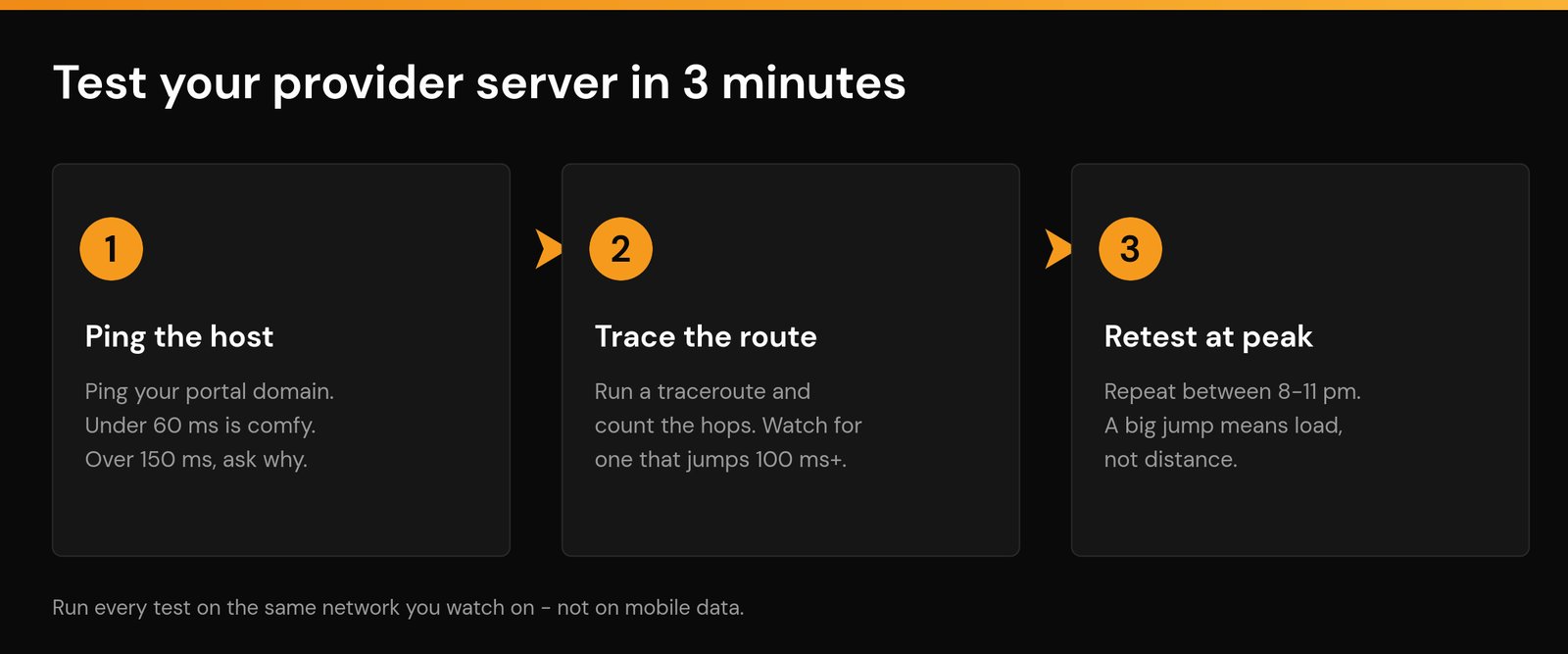
You do not need special tools. Everything below runs from a Windows Command Prompt, a macOS Terminal, or a phone app if that is easier. Grab the hostname from your portal URL — the part between http:// and the port number, for example portal.example.net.
- Ping the host. Run
ping portal.example.netand let it send at least twenty packets. Note the average and, more importantly, whether any packets are lost. Under 60 ms with zero loss is comfortable. Over 150 ms, or any loss at all, is worth asking about. Ping is measuring round-trip time, so the number already includes the return journey. - Trace the route. Run
tracert portal.example.neton Windows ortraceroute portal.example.neton macOS and Linux. Count the hops and look for a single step where latency jumps by 100 ms or more — that hop is your bottleneck, and it is usually a transit network, not the provider. Traceroute also shows you roughly which countries your traffic crosses. - Repeat it at peak. Run both again between 8pm and 11pm on a weeknight. If the ping barely moves but the stream stutters, the server is overloaded. If the ping doubles, the congestion is on the path or on your own line.
One caveat worth knowing: plenty of hosts block ICMP, so a ping that times out does not automatically mean the server is unreachable. If ping fails but the stream plays, the host is simply not answering pings — move on to the traceroute and judge by the last responding hop.
Run all three on the network you actually watch on. Testing from mobile data tells you about the phone network, not about your TV.
What to ask a provider before you buy
Most of this is answerable in a single support message, and how they answer tells you as much as what they answer. A service that gives you specifics is a service that has capacity to spare.
- “Which region will I be served from?” A straight answer is a good sign. Vagueness usually means one shared pool.
- “Do you load-balance across multiple servers, or is it one endpoint?” Multiple endpoints mean an overload has somewhere to spill.
- “Can I get an alternative host if my route is poor?” The answer should be yes.
- “What happens at peak?” Anyone who claims peak hours make no difference is either not measuring or not telling you.
Then verify it yourself. A free trial exists precisely so you can test during your own peak hours rather than trusting a sales page — and if you are buying through a middleman, our guide to resellers versus providers explains why the person you pay may not be the person running the server. For a wider checklist, see how to choose a good IPTV provider.
Does a VPN change any of this?
A VPN adds a hop, so on paper it should always make latency worse. In practice it goes both ways. If your ISP is throttling video traffic or routing you badly, a VPN endpoint with better peering can genuinely shorten the effective path and smooth out a stream. If your route was already clean, the VPN just adds 10 to 40 ms and some encryption overhead.
The rule of thumb: pick a VPN server in the same region as the streaming server, not the same region as you. Sending your traffic to a far-away VPN and then back across the world is the one configuration guaranteed to make things worse. There is more detail in our guide to using a VPN with IPTV.
So should server location decide who you buy from?
It should be a tiebreaker, not the headline. Between two services with similar pricing and similar reputations, take the one with an endpoint on your continent. But do not pay more for a “local server” from a provider you cannot test, and do not walk away from a well-run service just because its infrastructure sits a border or two away.
The honest hierarchy, in order: capacity at peak, then routing quality, then your own network, then distance. Get the first three right and the fourth almost never shows up on screen.
Frequently asked questions
Does IPTV server location affect picture quality?
Not directly. Resolution and bitrate are set by the provider’s encoder, not by how far away it sits. Distance only affects quality indirectly — if latency and packet loss get high enough that your player drops to a lower bitrate to keep playing.
What is a good ping for IPTV?
Anything under 60 ms is comfortable and you will not notice it. Between 60 and 150 ms is still fine for live TV, with slightly slower channel switching. Above 150 ms, especially with any packet loss, you should expect longer start times and occasional buffering at peak.
Why is my IPTV slow even though the server is nearby?
Almost always server load or your own network, not distance. A nearby node that is oversold will stutter every evening. Check whether the problem is time-of-day specific — if it is, capacity is the cause, and no amount of proximity will fix it.
Can I choose which IPTV server I connect to?
Sometimes. Providers running multiple endpoints will often issue you an alternative portal URL on request, especially if you show them a traceroute with a bad hop. Services running a single server cannot, which is itself useful information before you commit to a long plan.
Do IPTV providers really use CDNs?
Well-resourced ones do, or at least run their own multi-server distribution with load balancing. Smaller operations often run one or two rented machines and route everyone to them. That difference — not the country on the label — is what separates a stream that holds up at peak from one that does not.
Related guides
- Internet speed for IPTV: how much do you actually need?
- IPTV buffering at peak hours: causes and real fixes
- Best DNS for IPTV: does changing it stop buffering?
- Best router for IPTV: what actually stops buffering
- IPTV free trial: how to test before you buy
Written by the Nviewx team — we run a premium IPTV service and test setups daily across Firestick, Android TV, Apple TV, smart TVs and mobile. Last updated August 2026.