 Skip to content
Fire TV Cube for IPTV: Is It Worth It Over a Firestick? (2026)
By the Nviewx Team · Updated 2026
Short answer: the Fire TV Cube for IPTV is worth the extra money if you want a built-in wired Ethernet port and a faster octa-core processor that stays smooth with big playlists and heavy guide data. If you mostly stream over Wi-Fi and want to spend less, a Fire TV Stick 4K Max does almost the same job for about a third of the price. Below we compare both devices on the specs that actually affect playback, then help you decide which Fire TV to buy.
Both devices run the same Fire TV software, install the same player apps, and play the same M3U or Xtream Codes playlists. The real difference is horsepower and connectivity, and for streaming those are exactly the two things that separate a smooth picture from a stuttering one. Amazon’s Fire TV lineup ranges from a cheap stick to this set-top cube, so it helps to know what you are really paying for before you spend.
Fire TV Cube vs Fire TV Stick 4K Max: the specs that matter for IPTV
Here is how the current Fire TV Cube (3rd generation) and the Fire TV Stick 4K Max (2nd generation) compare on the hardware that affects IPTV performance:
| Spec | Fire TV Cube (3rd gen) | Fire TV Stick 4K Max (2nd gen) |
|---|---|---|
| Processor | Octa-core (up to 2.2 GHz) | Quad-core (2.0 GHz) |
| RAM | 2 GB | 2 GB |
| Storage | 16 GB | 16 GB |
| Built-in Ethernet | Yes (10/100) | No (USB adapter only) |
| Wi-Fi | Wi-Fi 6E | Wi-Fi 6E |
| Extra ports | USB-A, HDMI-in | Micro-USB only |
| Typical price | $139.99 | $59.99 |
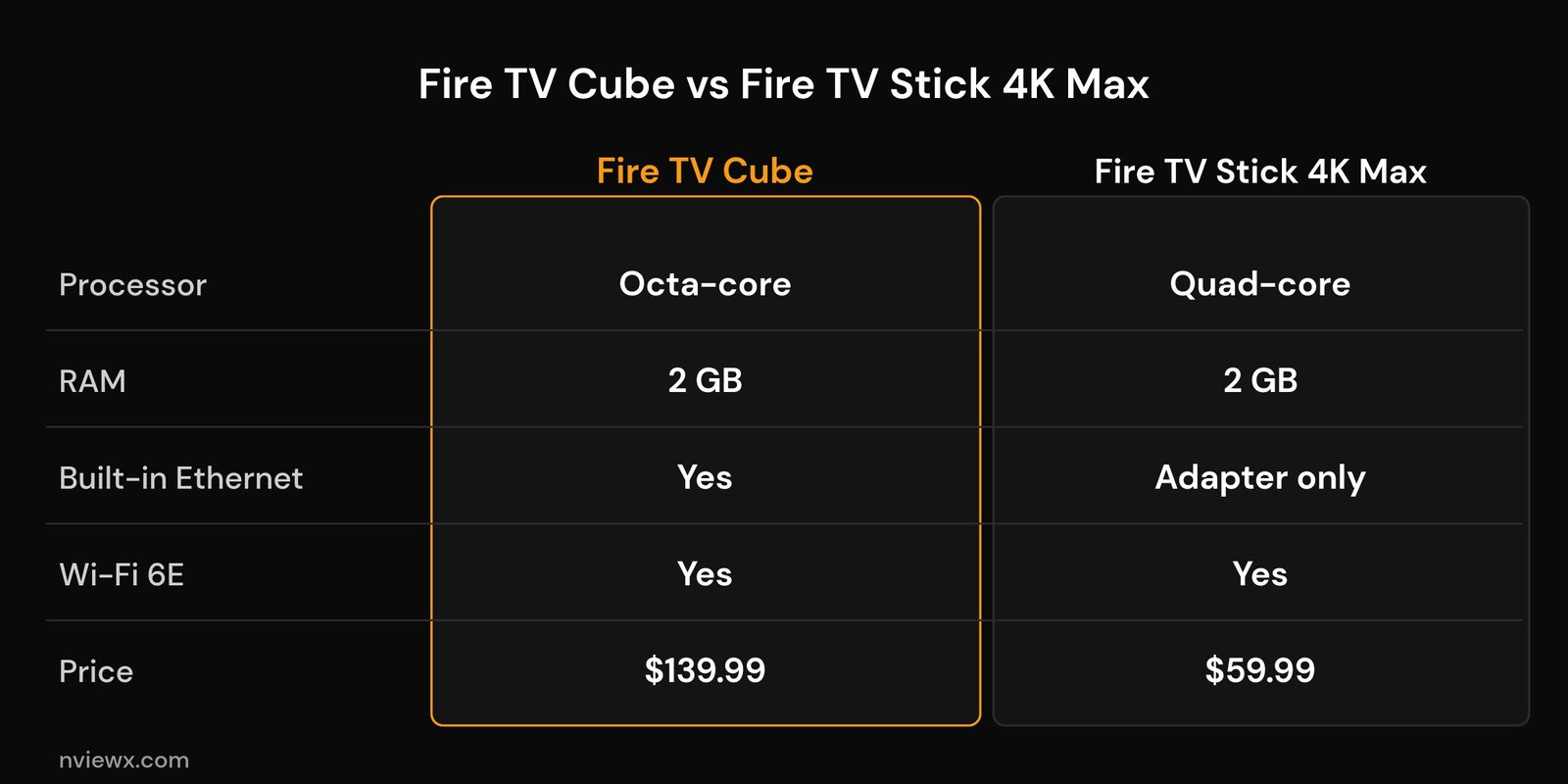
The headline surprise is memory: both boxes carry 2 GB of RAM, so the Cube is not the “more memory” upgrade many buyers assume. What the higher price actually buys you is the octa-core processor, a built-in Ethernet port, a spare USB-A port, an HDMI-in, and hands-free voice with a small built-in speaker.
Why the Fire TV Cube can be better for IPTV
Built-in wired Ethernet. This is the single biggest reason to pick the Cube for streaming. Plugging straight into your router with an Ethernet cable removes Wi-Fi congestion, interference, and drop-outs as a cause of buffering. If your streams stutter in the evening, a wired connection often fixes it outright, and our guide to IPTV buffering at peak hours explains why that time of day matters. The stick can only go wired with an add-on adapter.
A faster processor. Big provider playlists with thousands of channels and full guide data are surprisingly heavy on a streaming device. The Cube’s octa-core chip loads channel lists, scrolls the EPG, and switches streams faster than the quad-core stick, so the interface feels snappier the larger your playlist gets.
More thermal headroom. A set-top box has room to shed heat, while a stick tucked behind the TV can warm up and throttle during long sessions. For all-day live TV, the Cube tends to hold performance more consistently.
Hands-free voice and HDMI-in. The Cube listens for voice commands without touching the remote and can pass another HDMI source through to your TV. Neither is essential for IPTV, but both are genuine extras the stick lacks.
Where the Fire TV Stick 4K Max still wins
Price. At around $59.99 versus $139.99, the 4K Max costs roughly a third as much. For many households that gap alone decides it.
Same RAM, same Wi-Fi. Both devices have 2 GB of RAM and the newer Wi-Fi 6E radio, so on a strong wireless network their day-to-day IPTV playback is very close.
You can still go wired. A cheap USB Ethernet adapter gives the stick a wired connection too, closing most of the gap for a few dollars. If you are leaning stick, our roundup of the best Fire TV Stick for IPTV and the best IPTV player apps for Firestick will help you set it up well.
Who should buy the Fire TV Cube for IPTV?
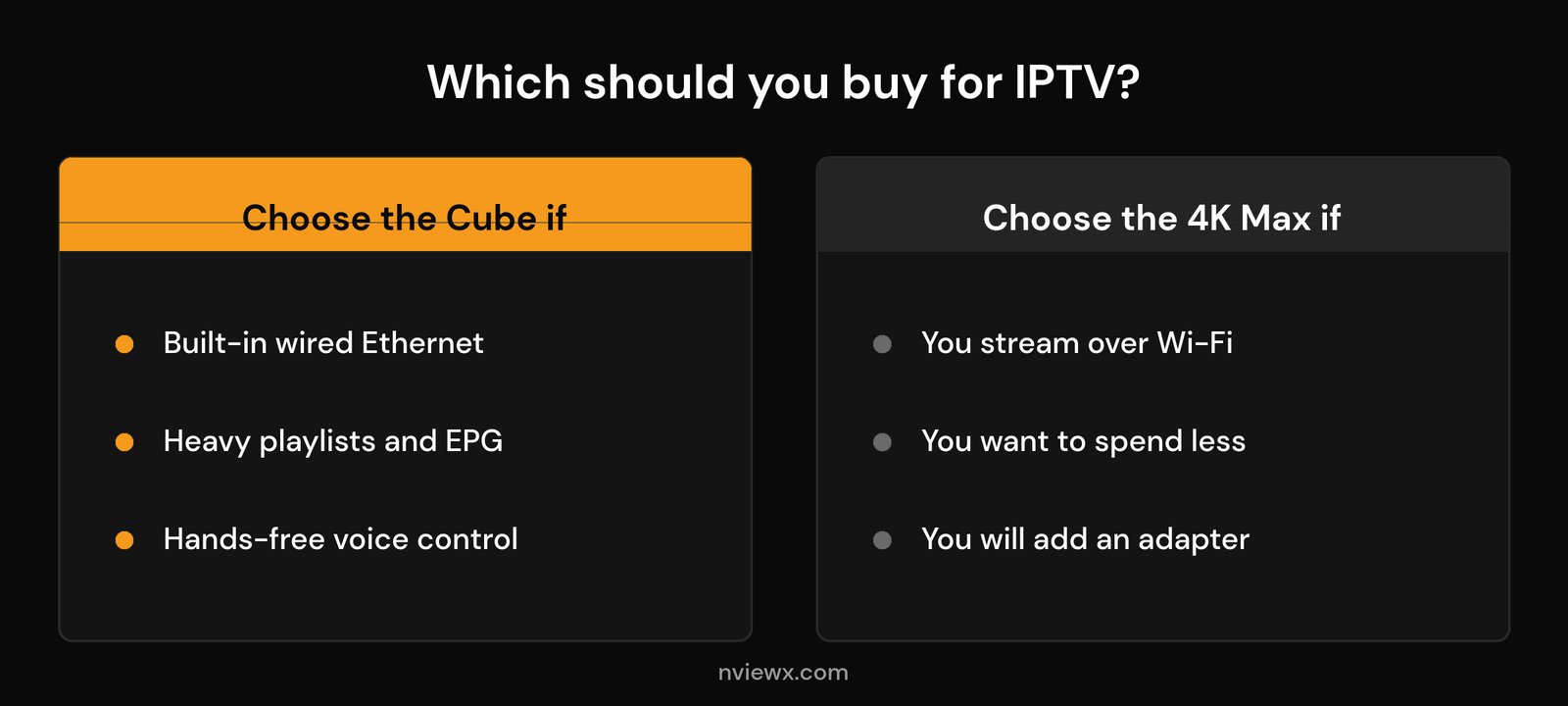
Buy the Fire TV Cube if you want built-in wired Ethernet without an adapter, you run very large playlists or heavy guide data, you watch long live sessions, or you like hands-free voice control. It is the most capable Fire TV device for demanding IPTV setups.
Buy the Fire TV Stick 4K Max if you stream mostly over solid Wi-Fi, you want to spend less, and you are happy to add a small USB Ethernet adapter later if you need it. For most casual viewers, it is the better value.
One more thing worth weighing is how long you plan to keep the device. The Cube’s faster chip gives it more headroom as player apps and playlists grow heavier over the next few years, so it can be the smarter long-term buy even though the stick wins on upfront cost. If you tend to replace your streaming box every couple of years anyway, that longevity argument matters much less and the savings win.
If neither Fire TV feels like enough, for example you want a more open system or a faster box for premium channels and 4K movies and series, compare a dedicated streamer in our MAG box vs Firestick vs Android TV box breakdown and our picks for the best Android TV box for IPTV.
How to set up IPTV on a Fire TV Cube
Setup is the same on the Cube and the stick. Once your box is signed in and updated:
- In Settings > My Fire TV > Developer options, allow apps from unknown sources so you can install a third-party player.
- Install a player app such as a well-known M3U or Xtream Codes client from the app store or a trusted downloader.
- Open the player and add your subscription using the playlist URL or the Xtream Codes login your provider gave you.
- For the smoothest result, connect the Cube to your router with an Ethernet cable, or tune your wireless first with our best Wi-Fi settings for IPTV guide.
- Let the guide data load fully before you start channel-surfing so the EPG shows correct times.
That is all it takes. The hardware you chose only decides how smoothly those channels and the guide behave once everything is loaded.
Frequently asked questions
Is the Fire TV Cube worth it for IPTV over a Firestick?
Yes, if you value built-in wired Ethernet and a faster processor for large playlists and guide data. If you stream over strong Wi-Fi and want to save money, a Fire TV Stick 4K Max handles IPTV nearly as well for far less.
Does the Fire TV Cube have a built-in Ethernet port?
Yes. The 3rd-generation Fire TV Cube includes a 10/100 Ethernet port in the box, so you can plug straight into your router without buying an adapter. The Fire TV Stick 4K Max needs a separate USB Ethernet adapter to go wired.
Does more RAM on the Cube help IPTV?
Not in this comparison, because both the Cube and the 4K Max have 2 GB of RAM. The Cube feels faster because of its octa-core processor and wired connection, not extra memory.
Can the Fire TV Cube play 4K IPTV streams?
Yes. Both the Cube and the 4K Max support 4K HDR playback, so either can play high-resolution live TV, sports, and on-demand titles as long as your connection has the bandwidth for them.
Do I still need good internet if I buy the Cube?
Absolutely. A faster box cannot fix a weak or overloaded connection. The Cube’s wired port helps, but stable bandwidth from your provider and router still matters most for buffer-free streaming.






