 Skip to content

Best IPTV Players for Android TV and Google TV in 2026
If you want the best IPTV player for Android TV or Google TV in 2026, here is the short version: TiviMate is the one most people should install, OTT Navigator is the pick if you like tweaking every setting or watching two to four streams at once, and IPTV Smarters Pro is the easiest starting point, especially if you also want the same app on your phone. If you would rather not pay a penny, Kodi and VLC still do the job. The rest of this guide shows how they actually behave on a real TV, which app suits your specific device, and how to get each one installed.
One thing to clear up first, because it trips a lot of people up: on the hardware side, Google TV is just a newer interface that sits on top of Android TV. Underneath, it is the same operating system, so any IPTV player that runs on Android TV runs on Google TV too. A best Android TV IPTV player and a best Google TV IPTV player are the same shortlist.
Android TV vs Google TV: does your player choice change?
No. Google TV is a content-forward launcher Google put on newer streaming sticks, boxes and smart TVs, but it still runs Android TV underneath. The app files are identical, the Play Store is the same, and sideloading works the same way. So whether your device says Android TV in the settings or shows the Google TV home screen, every player below will install and run. The only real difference is cosmetic: Google TV pushes its own recommendations on the home screen, which you can ignore the moment you open your IPTV app.
The best IPTV players for Android TV and Google TV at a glance
Here is how the main players stack up on the things that actually matter on a television: an accurate EPG (TV guide), recording, and how many streams you can watch at once. Prices are typical at the time of writing and can change.
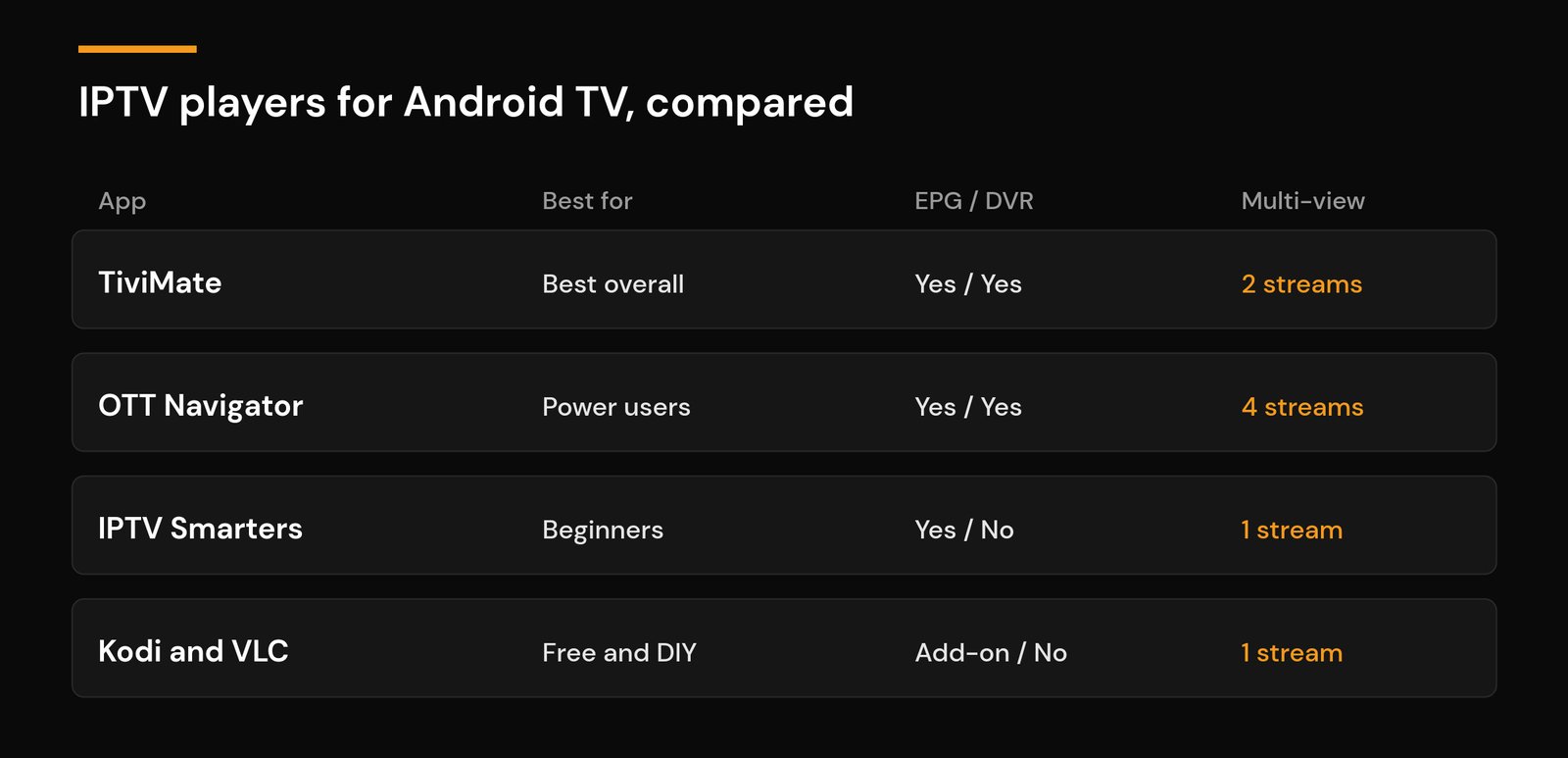
| App | Best for | EPG + recording | Multi-view | Typical price |
|---|---|---|---|---|
| TiviMate | Best overall | Yes, with DVR | Up to 2 streams | Free; a few dollars/yr premium |
| OTT Navigator | Power users | Yes, with DVR | Up to 4 streams | Free; small premium |
| IPTV Smarters Pro | Beginners, many devices | Guide yes, no true DVR | 1 stream | Free |
| XCIPTV | Flexible middle ground | Yes | 1 stream | Free; optional premium |
| Kodi + PVR add-on | Free and DIY | Yes, via add-on | 1 stream | Free |
| VLC | Simple playback | No guide | 1 stream | Free |
The IPTV players, reviewed
TiviMate: the best all-round IPTV player for Android TV
TiviMate is the app most long-time viewers on Android TV end up recommending, and for good reason. It was built for the ten-foot living-room experience, so the layout, the guide and the remote navigation all feel like a proper TV app instead of a phone app stretched onto a big screen. It loads M3U playlists and Xtream Codes logins, reads the EPG cleanly, remembers your favourites, and its recording and catch-up features are the most polished on the platform. The free version is generous; a small yearly premium (usually only a few dollars) unlocks multiple playlists, recording and picture-in-picture. The one catch is reach: TiviMate only runs on Android TV and Fire TV, so it is not an option on a Samsung or LG smart TV. Firestick owners can follow our walkthrough for installing IPTV on a Firestick, and the same steps apply to Google TV.
OTT Navigator: best for power users and multi-view
OTT Navigator is the most configurable IPTV player you can put on an Android TV box. If you enjoy fine-tuning buffer sizes, guide layouts, catch-up behaviour and decoder settings, it gives you more knobs than almost anyone needs. Its standout trick is multi-view: it can split the screen into up to four streams at once, which is handy for keeping an eye on several live events. It has a strong EPG and its own recording options. The trade-off is complexity, since first-time users can feel lost in the menus, so it rewards people who like to tinker more than those who just want to press play.
IPTV Smarters Pro: best for beginners and cross-platform use
IPTV Smarters Pro has been around for years and is still the friendliest place to start. Setup is a simple matter of entering your Xtream Codes login or an M3U URL, and you are watching in under a minute. Its biggest advantage is reach: the same app runs on Android TV, phones, tablets, Windows and more, so your setup stays consistent across devices. Because it was originally designed for touchscreens, remote navigation is a little less slick than TiviMate’s, and it has no true DVR, but for most newcomers it is more than enough. If you are brand new to all this, start with our step-by-step IPTV setup guide.
XCIPTV: a flexible middle ground
XCIPTV sits between the simplicity of IPTV Smarters and the depth of OTT Navigator. It supports M3U and Xtream Codes logins, has a workable guide, and offers a clean player with decent customization. It is a solid backup if one of the bigger names does not play nicely with your provider, and it is worth keeping on the shortlist when you are testing which app handles your playlist best.
Kodi: the best free, do-it-yourself option
Kodi is a free, open-source media centre that becomes an IPTV player once you add the PVR IPTV Simple Client add-on and point it at your M3U and EPG URLs. It is the most flexible free route and it doubles as a home for your local videos and music, but the initial setup takes more patience than a purpose-built app. If you want maximum control without paying, Kodi is the one to learn.
VLC: the simplest free playback
VLC is the plain, no-frills choice. Open an M3U playlist and it plays the channels, with no guide, no recording and no favourites to speak of. It will not replace TiviMate for daily viewing, but it is a great does-my-playlist-even-work test tool and a dependable fallback that plays almost any stream format, including HEVC (H.265), without fuss.
Which IPTV player should you use for your device?
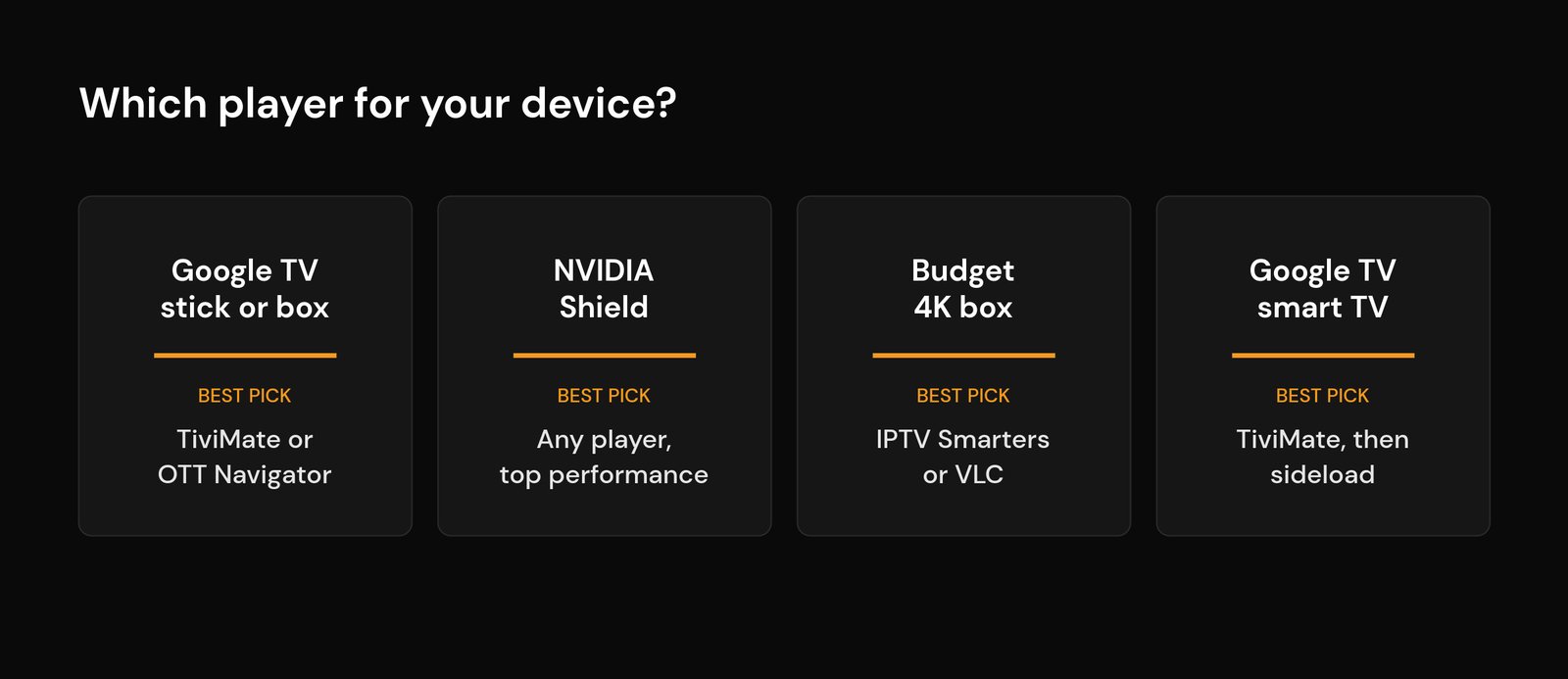
The right app depends as much on your hardware as your preference. A few real-world pointers by device:
Google TV streaming sticks (such as a Chromecast with Google TV): TiviMate or OTT Navigator both run well, but these sticks often ship with only 8 GB of storage and modest memory, so install one or two players rather than five and clear the app cache now and then.
NVIDIA Shield: the most powerful mainstream Android TV device. Any player here runs smoothly, including 4K HEVC streams and OTT Navigator’s four-way multi-view.
Budget 4K Google TV boxes: the very cheap boxes can struggle with heavy apps, so IPTV Smarters or VLC are lighter on resources, and lowering the buffer or using a wired connection helps a lot.
Smart TVs with Google TV built in (many Sony, TCL and Hisense models): TiviMate is the best pick, though some apps are not listed in the on-TV Play Store, so you may need to sideload (see below). If your TV instead runs Samsung Tizen or LG webOS, TiviMate is not available; an external Android TV box is the usual fix, which we weigh up in our MAG box vs Firestick vs Android TV box comparison. Prefer Apple’s ecosystem instead? We cover those apps in the best IPTV player for Apple TV guide.
How to install a player that is not in the Play Store
Most of these apps are in the Android TV Play Store, but a few come and go, so it helps to know the sideload routine. The standard method uses the free Downloader app: install Downloader from the Play Store, allow it to install unknown apps in your device settings, then enter the official APK link for the player and let it download and install. It is the same routine on any Android TV or Google TV device, and our Firestick installation guide shows the steps in detail; they translate directly to Google TV boxes.
Settings that stop buffering, crashes and audio drift
Whichever player you choose, a few settings decide whether playback is smooth or a spinning wheel. Nudge the buffer size up a step if streams stutter, and turn on hardware decoding so the chip handles HEVC (H.265) instead of the CPU. If an app keeps closing, clear its cache and make sure the device has free storage. Network usually matters more than the app: a wired connection or a cleaner DNS often fixes more buffering than swapping players, so it is worth checking whether changing your DNS helps, and if privacy on your line is a concern, see whether you need a VPN for IPTV. For how IPTV differs from mainstream streaming in the first place, our IPTV vs OTT explainer is a good primer.
Frequently asked questions
What is the best IPTV player for Android TV in 2026?
For most people it is TiviMate, thanks to its TV-first design, reliable EPG and built-in recording. Choose OTT Navigator if you want deep customization or up to four streams at once, or IPTV Smarters Pro if you want the simplest setup and the same app across your phone and computer.
Is a Google TV IPTV player different from an Android TV one?
No. Google TV runs on top of Android TV, so the apps are identical. Any player that works on Android TV works on Google TV; only the home-screen interface looks different.
What is the best free IPTV player for Android TV?
For a full experience, Kodi with the PVR IPTV Simple Client add-on. For quick, no-setup playback, VLC. TiviMate and IPTV Smarters also have capable free tiers you can use before paying for anything.
Does TiviMate work on a Chromecast with Google TV?
Yes. TiviMate installs and runs on a Chromecast with Google TV. Just keep an eye on storage on the 8 GB models: keep only the apps you use and clear the cache occasionally.
Why does my IPTV player keep buffering on Android TV?
It is usually the network rather than the app. Try a wired connection, raise the buffer size, enable hardware decoding, and test a different DNS. Peak-time congestion from your provider can also be the cause.






