 Skip to content
IPTV Scam Emails: How to Spot Fake Renewals in 2026
If a message lands in your inbox warning that your IPTV subscription is about to expire and you must “renew now” or lose access, slow down before you click. IPTV scam emails are one of the most common ways people who use streaming apps end up with a drained card or a hijacked account. The message looks urgent, it looks official, and every part of it is built to make you act before you think.
The good news is that almost every fake renewal message carries the same handful of tells. Once you know what to look for, you can spot an IPTV subscription scam in about ten seconds and delete it without a second thought. This guide breaks down how the scam works, the exact red flags, how to verify a real email, and what to do if you have already clicked or paid.
What IPTV scam emails actually are
An IPTV scam email is a form of phishing: a fake message pretending to come from your provider or a “billing department” so you hand over money or account details. These emails are almost never sent because someone actually knows your plan is expiring. They are blasted out to enormous lists of addresses, betting that a small percentage will reach real customers at a moment when the warning feels plausible.
Because a sender can fake the display name through email spoofing, the message can appear to come from a service you recognise. What a scammer cannot easily fake is the real sending domain, the true destination of each link, and the payment method they push you toward. Those three things are where nearly every IPTV phishing attempt gives itself away, and they are what the rest of this guide teaches you to read.
How a fake IPTV renewal scam works
Nearly every IPTV subscription scam runs on the same three-stage pattern. Understanding the pattern makes each individual email easy to place, even when the wording changes.
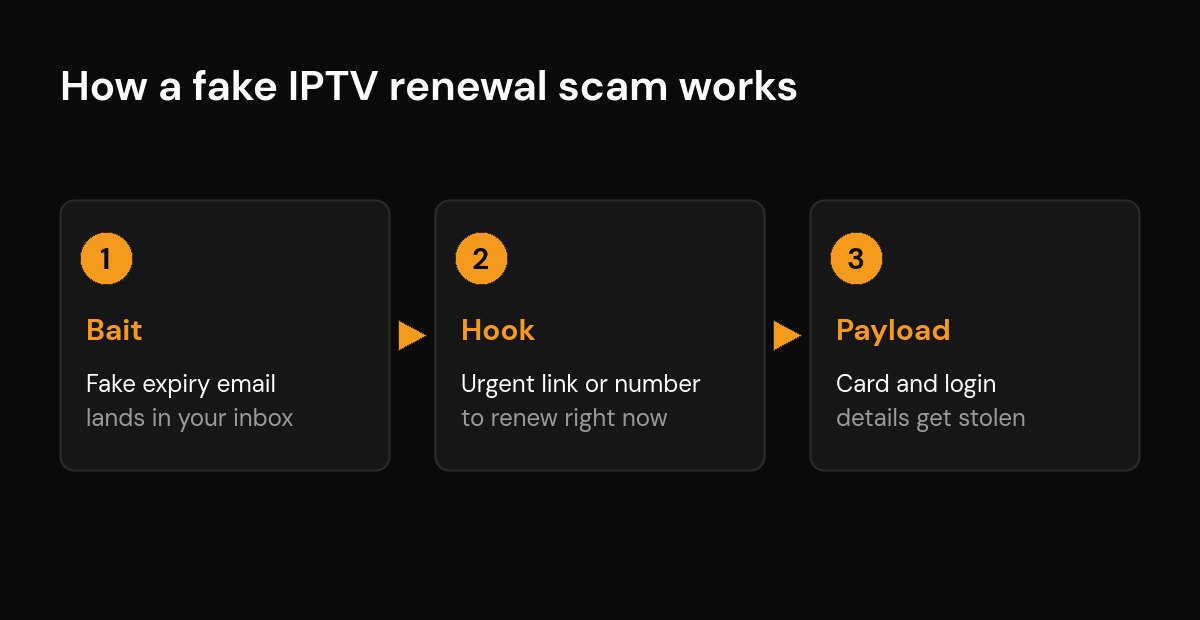
The bait is the opening email itself: a message claiming your subscription has expired, your payment failed, or your account has been suspended. The hook is the pressure it applies, usually a countdown (“expires today”), a threat (“your channels will be cut off”), and a single big button or phone number to “fix” it right now. The payload is what happens after you act: a lookalike login page harvests your username and password, or a fake checkout page captures your card number. In some versions the “support agent” on the phone talks you into buying gift cards or sending a transfer, which is money you can never recover.
None of this requires the scammer to know anything real about you. The whole system works on volume and timing, which is why the same email can reach someone with no IPTV service at all.
5 red flags in a scam IPTV email
You do not need to check all five to be sure. In practice, one clear red flag is enough to stop and verify. Seeing two or more together is as close to a guarantee of a scam as you will get.
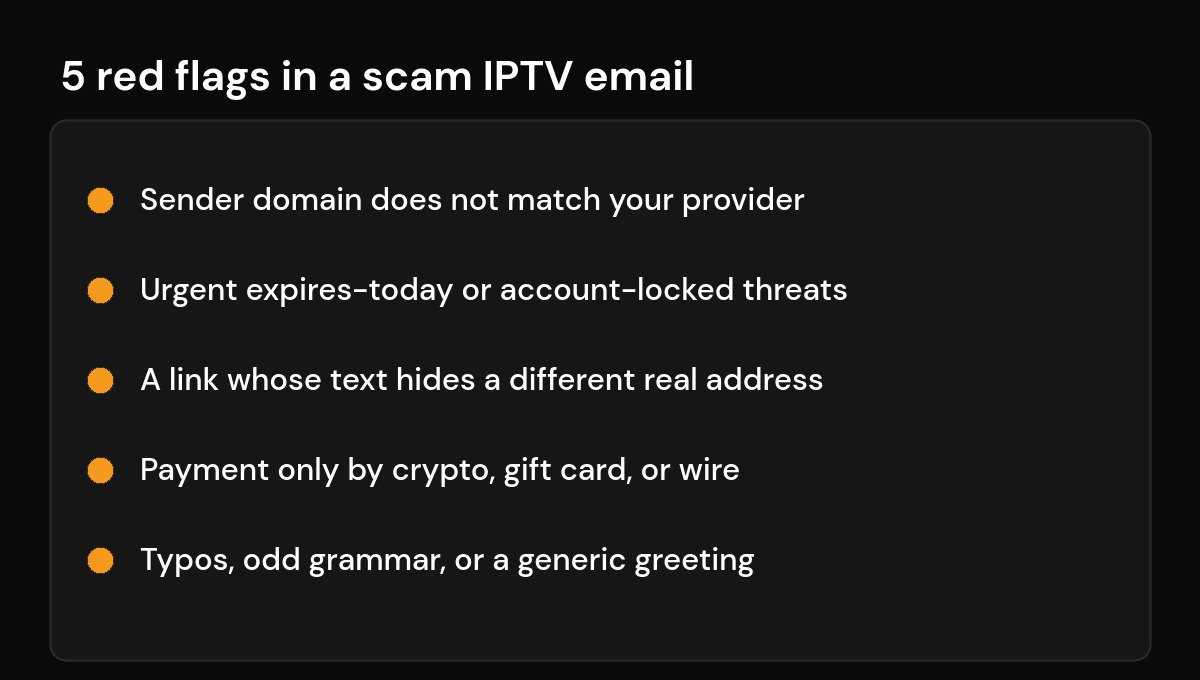
The quickest way to judge a message is to compare it against what a real provider email looks like. The table below lines them up side by side.
| What to check | Real provider email | Scam IPTV email |
|---|---|---|
| Sender address | Matches the provider’s real website domain | Lookalike, misspelled, or a random free-mail address |
| Links | Point to the official site you already use | Link text hides a different, unfamiliar address |
| Tone | Clear, no pressure, gives you time | Urgent threats, countdowns, “act now or lose access” |
| Payment | Normal card payment on a secure page | Crypto, gift cards, or a friends-and-family transfer |
| Writing | Consistent branding and clean grammar | Typos, odd phrasing, or a generic “Dear customer” |
The payment row deserves special weight. A demand for cryptocurrency or gift cards is the single strongest tell, because those methods are chosen for one reason: they leave you with no way to claw the money back. Our guide to safe IPTV payment options goes deeper on which methods actually protect you.
How to check if an IPTV email is real
When a renewal or billing email makes you even slightly uneasy, run these steps in order and do not skip the first one.
- Do not click anything in the email. Not the button, not the “unsubscribe” link, not a phone number. Every action inside the message is on the scammer’s terms.
- Read the full sender address, not just the name. Expand the “From” field and check the part after the @. If it is not the provider’s real domain, stop there.
- Hover over links before trusting them. On a computer, hovering shows the real destination in the corner of the screen. If the visible text and the real address disagree, it is a scam.
- Go to the provider directly. Open a new browser tab, type the official site you already use, and log in there. If your subscription genuinely needs attention, it will show up in your account.
- Contact support through a channel you already trust — the one saved from when you first signed up, not a number pulled from the suspicious email.
If the email was pushing you to buy from an unfamiliar seller in the first place, that is a separate warning sign. Our checklist on how to spot a fake IPTV service covers vetting a provider before you ever hand over a payment.
What to do if you already clicked or paid
Acting fast limits the damage. Work through this list in order.
- Change the password you entered, and change it anywhere else you reused it. Turn on two-factor authentication where it is offered.
- Call your bank or card issuer if you entered card details or paid. Ask them to block the card and watch for fraud. The sooner you call, the better your odds of reversing a charge.
- Watch your statements for small “test” charges as well as large ones. Our guide on unauthorized IPTV charges explains how to spot and stop them.
- Scan the device if you downloaded anything the email pointed you to. The checks in are IPTV apps safe help you confirm nothing harmful slipped in.
- Report the message as phishing in your email app so future copies get filtered, then delete it.
How to stop IPTV scam emails reaching you
You cannot switch these emails off entirely, but you can shrink how many arrive and how convincing they feel. Use a dedicated email address for streaming sign-ups so a leak from one service does not spill into your main inbox. Avoid posting that address publicly on forums or comment sections, where scrapers collect it. Mark scam messages as spam rather than just deleting them, so your provider learns the pattern. And never reply or use the “unsubscribe” link inside a suspicious email, since any response simply confirms your address is live and worth targeting again. A little distance between your real identity and your streaming accounts goes a long way; the wider picture is covered in how to avoid the risks of using IPTV.
Frequently asked questions
How do I know if an IPTV renewal email is a scam?
Check the sender’s real address after the @, hover over any link to see where it truly leads, and look at the payment method. A mismatched domain, a hidden link destination, or a demand for crypto or gift cards means it is a fake IPTV renewal email. When in doubt, ignore the email and log in to your account directly instead.
Can opening an IPTV scam email harm me?
Simply opening and reading a message is almost always safe. The danger begins when you click a link, download an attachment, or enter details on the page it opens. Treat the email as harmless to read but never act on anything inside it.
Why am I getting IPTV scam emails if I never signed up?
These messages are sent to massive address lists, not to confirmed customers. Your address may have appeared in a data leak or been scraped from a public post. Receiving one does not mean any of your accounts were breached; it simply means your address is on a list.
I paid a scammer with a card. Can I get my money back?
Possibly, if you act quickly. Call your bank or card issuer, report the transaction as fraud, and ask them to block the card. Card payments offer far more protection than crypto or gift cards, which is exactly why scammers prefer the latter.
Is it safe to reply and ask if the email is genuine?
No. Replying confirms your address is active and often invites more targeting. If you want to verify, contact the provider through a channel you already trust, such as the site or support address you saved when you first signed up.






