Nviewx Guide

Find quick answers, helpful guides, and support resources to make your streaming experience smooth. Browse our Help Center.

How Can I Reactivate My Subscription After Expiration?

If your subscription to Nviewx has expired and you want to reactivate it, don’t worry – it’s easy! Simply follow these steps:

Reactivating Your Subscription

Here’s how you can quickly reactivate your subscription:

  1. Log in to your Nviewx account.
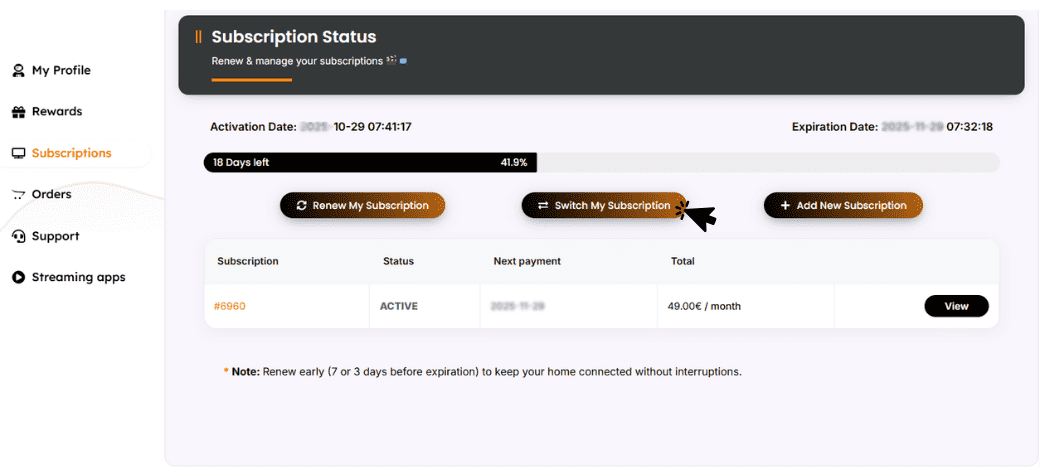
  2. Head to the Subscription Section.
  3. Click “Renew my subscription” if you want to keep the same subscription or “Switch my subscription” if you want to change it.
  4. Enter your payment details and finalize the process.
  5. Upload proof of payment to the form.
  6. Your subscription will be reactivated, and you can continue streaming without interruption!

Need More Help?

If you need assistance reactivating your account, feel free to visit our Contact Page for additional support.

Win Unlimited Gifts & Rewards

Add unlimited extra free months to your subscription with just one click

Share with Your Friends & Family

Invite & Earn: Get 1 Month Free for Every Friend You Refer